


No single tool is best at both halves, so split the question. For building an Orchestration, Workday’s own Developer Copilot for Orchestrate is the documented AI route; for building and running a Studio integration, an agent that drives your installed Studio, such as Kiweely Vine, is the option; for testing, Studio’s built-in AUnit covers assembly logic and end-to-end test vendors cover the rest.
Which AI tool builds and tests which kind of integration?
| Job | Tool | What it does | What it does not do |
|---|---|---|---|
| JobBuild an Orchestration | ToolWorkday Developer Copilot for Orchestrate | What it doesEdits an orchestration in Orchestration Builder from a description, as a copy you accept or reject | What it does not doNeeds Extend AI; no tenant context; cannot create several named components; not for Studio or EIB integrations |
| JobBuild an Orchestration | ToolWorkday Developer Agent | What it doesWorkday’s product page says it builds orchestrations; the Developer Guide lists apps, pages, scripts and queries | What it does not doSee the orchestration question |
| JobBuild a Studio integration | ToolA chat or coding assistant (Claude Code, Cursor and the like) | What it doesDrafts XSLT and Java in your editor | What it does not doCannot build, deploy or launch in Studio |
| JobBuild a Studio integration | ToolWorkday’s own AI tools | What it doesNone is documented for Studio: Developer Copilot for Orchestrate says it does not work with Studio integrations, and Developer Agent’s pages cover Extend apps, agents, pages, scripts and queries | What it does not doDeveloper Agent’s Claude Code plugin and IDE extension work on Extend projects, not Studio assemblies |
| JobBuild and run a Studio integration | ToolKiweely Vine | What it doesDrives your installed Studio to edit, build, deploy and launch | What it does not doNeeds your own Workday Studio install |
| JobUnit-test a Studio assembly | ToolStudio AUnit | What it doesUnit tests for assemblies | What it does not doDoes not call external systems or cover tenant configuration |
| JobTest end to end | ToolTest vendors | What it doesAutomate repeatable checks across systems | What it does not doPer their own pages; see below |
Where does Workday’s Developer Copilot fit for Orchestrations?
Workday’s Getting Started with Orchestrate page describes Orchestrate as a web-based application for building custom integrations with Orchestration Builder and Expression Builder, using templates to connect an orchestration to an integration system or a business process. Developer Copilot for Orchestrate sits inside that builder. Workday says it works only for Extend AI customers, cannot connect to a tenant, cannot create components such as Trigger Integration or Send Prism Request, and does not work with Studio integrations, EIB integrations or Journey orchestrations. Workday calls it experimental. The detail is in Can Workday Developer Agent build orchestrations?, and the choice between Orchestrate and Studio in Orchestrate vs Studio.
Workday also says Copilot is available to Extend AI customers in the North America and EMEA regions only. No Rate Card line prices Developer Copilot, so Workday publishes no cost for it. Developer Agent’s published meter is 50,000 invocations a year, then 2 Flex Credits each.
What is Studio, and why do tools struggle with it?
Workday describes Studio as an Eclipse-based IDE you download separately, not part of Workday, for building more sophisticated integrations that Workday hosts and runs for you. You design assemblies, deploy them to the Cloud Repository, and launch them like any other integration. A chat model that writes XSLT cannot do any of those steps, which is why a drafted fragment is not a delivered integration. See best AI agent setup for Workday Studio for the setup that keeps Studio’s own controls in the loop.
How do you test a Studio integration?
Three layers, in order of how cheaply they fail:
- AUnit. Workday’s AUnit page describes a framework for unit tests of assemblies. You create a Workday Assembly Project with the Workday Runtime target, add a Java class whose superclass is
com.workday.aunit.AssemblyTestCase, and add the JUnit library. Walkthrough: Workday Studio AUnit testing. - A real run in a non-Production tenant. Deploy the assembly, launch the integration system with known input, and read the output and the integration event. AUnit does not cover this.
- End-to-end checks in the systems around it. This is the category test vendors sell. TestMu AI’s Workday testing page says it covers Workday EIBs, Studio orchestrations and Core Connectors end to end, triggered from tools such as Jenkins, and Opkey’s Workday page says it traces Studio assembly dependencies and validates inbound and outbound data transformations, XSLT mappings and API connections. Those are the vendors’ own descriptions, read on 16 November 2026. Ask each to run a demo on one of your assemblies before you buy; this page has not tested either product, and no public independent comparison of their Studio coverage was found.
What does Kiweely’s Studio loop look like?
Kiweely Vine drives the Workday Studio already installed on your computer, so the edits, build, deploy and launch happen in Studio. Kiweely ships no Workday code. In its public film, Kiweely built a multi-currency payroll reconciliation Studio integration from a plain-language request, then tested, deployed and ran it, in an 83-minute recorded session in a Development tenant with sample data. After a mapping was corrected, the rerun balanced: 8 payments accepted, a duplicate excluded, USD 9,336.61 on each side. The reviewer could not open Studio’s native assembly view, so the film shows the results, not an inspection of the flow itself. Details: driving Eclipse Workday Studio with an AI agent and the payroll feeds write-up.
For Orchestrations, a second public film shows a new-hire handoff Orchestration for Integration built from one request and run in Development in 59 minutes; a second run flagged a worker with a missing work email (see the write-up and Orchestrate setup). The runs are demonstrations, not customer results.
Kiweely Vine does the build, run and test work in your tenant and Studio, so consultants spend their time on design and review.
Watch Kiweely Vine do this work
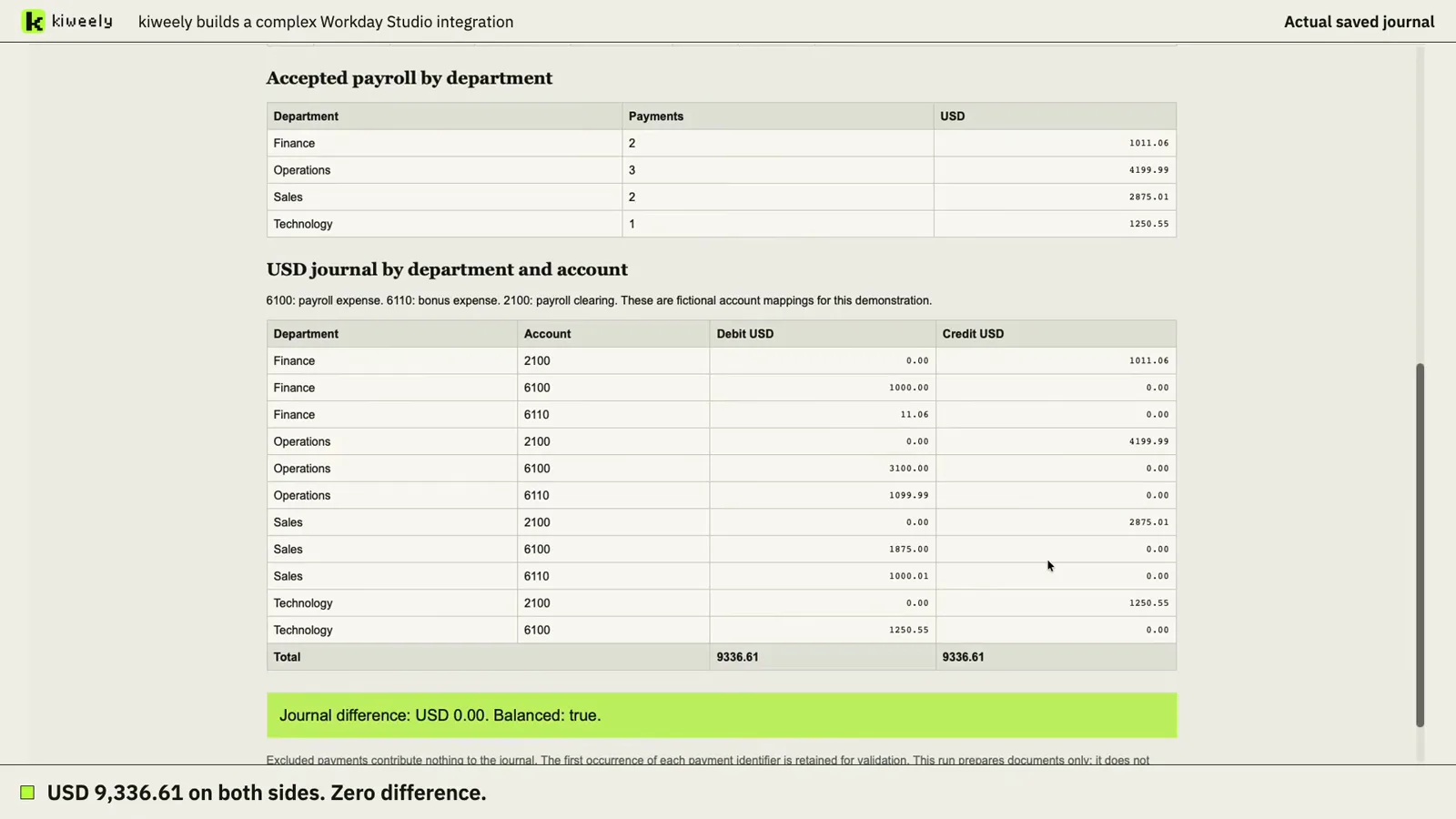
Each film is one real run in a Workday Development tenant, from a plain request to the checked result.
- Workday Studio: a payroll reconciliation integration built, tested, deployed and run, then corrected until it balanced. Watch the film (6 min)
- Orchestrate: a new-hire handoff Orchestration for Integration built, run and checked. Watch the film (8 min)
Where the testing suites fit beside an agent that builds: Workday testing tools: Kiweely Vine vs Kainos, Opkey and Tosca. Every tool side by side: the best AI tools for Workday, compared.
Frequently asked questions
Can Workday's Developer Copilot build Workday Studio integrations?
No. Workday's documentation says Developer Copilot for Orchestrate does not work with Workday Studio integrations, EIB integrations or Journey orchestrations. It works on orchestrations in Orchestration Builder.
Does Studio have its own testing tool?
Yes. AUnit is Workday Studio's framework for unit tests of assemblies, created from a test skeleton whose superclass is com.workday.aunit.AssemblyTestCase. It tests assembly logic locally; a run against a tenant is still needed for transports and configuration.
Which test vendors say they cover Studio integrations?
TestMu AI's Workday testing page lists Workday Studio orchestrations, EIBs and Core Connectors, and Opkey's Workday page mentions Studio integrations and tracing assembly dependencies. Both are vendor claims we have not run; ask each for a demonstration on your assembly.
Can an AI agent run Workday Studio for me?
Kiweely Vine drives the Workday Studio you have installed on your own computer, so the build, deploy and launch happen in Studio itself. Kiweely ships no Workday code.