


Kiweely Vine drives the Workday Studio already installed on your computer. It does not invent a parallel IDE: a small drop-in plugin talks to your Eclipse Studio over a private loopback helper, and Studio performs the real assembly edits, CLAR builds, Cloud Repository deploys, launches, and log reads. That is how an AI conversation ends with a working integration system instead of a pasted XSLT fragment.
Workday Studio remains the only supported authoring surface for sophisticated hosted integrations when Connectors and EIB are not enough. Consultants who try to “AI away” Studio usually discover that mediation routes, Text Schema parsers, and custom Java Spring beans still live in an Eclipse workspace.
Why Studio Still Owns Batch Assemblies
Per Workday’s Concept: Workday Studio, you design flows called assemblies in the Assembly Editor, package them into collections, and deploy a CLAR (Cloud Archive) to the Cloud Repository. Workday then launches the integration in a protected Cloud Runtime, and terminates runs that exceed two hours. Process Monitor surfaces Failed or Completed with errors; clearing the second status is still the integration developer’s job.
Those mechanics matter for AI tooling:
| Step | What Workday Studio does | What Kiweely Vine adds |
|---|---|---|
| StepAuthor | What Workday Studio doesAssembly Editor components, XSLT, Text Schema, Java beans | What Kiweely Vine addsAgent proposes and applies edits through the installed Studio |
| StepPackage | What Workday Studio doesCollection membership and CLAR binary (no Java sources by default) | What Kiweely Vine addsTriggers the same Studio build/deploy path you would click |
| StepDeploy | What Workday Studio doesCloud Explorer connection to Sandbox, Production, or added environments | What Kiweely Vine addsUses your Studio connection after a usable sign-in is available |
| StepProve | What Workday Studio doesLocal test, launch, Process Monitor, integration event logs | What Kiweely Vine addsLaunches, reads logs, and files notes under the Client and Project |
If the workload is a short REST callback or JSON sync, evaluate Orchestrate for Integrations first. Keep Studio when you need streaming XML, multi-report joins, or Java extensions that Orchestrate does not replace.
How the Drop-In Plugin Loop Works
- You already run Workday Studio (Eclipse-based; JDK 17 for the IDE and JDK 8 for the Studio runtime on supported OS installs).
- Kiweely places its plugin in Studio’s standard
dropins/folder. No Workday plugin is modified or reverse-engineered. - A conversation pins the Client and tenant. Studio needs a sign-in it can use: saved Workday sign-in details, Username and password, or an API client with authorization code and PKCE.
- With consent, the agent asks Studio to open the assembly project, edit mediation steps, rebuild, deploy the collection, launch the integration system, and return log lines into the conversation.
Conversation (Client: Calder Bank · Studio project)
  -> consent card: "Deploy payroll-vendor collection to Sandbox?"
  -> Studio drop-in plugin (local only)
  -> Assembly Editor / Cloud Explorer actions
  -> Cloud Repository CLAR replace
  -> Integration event + Process Monitor status
  -> logs and next fix back in chat
When Studio has no usable sign-in, Kiweely stops on a card. A background browser refresh alone does not close that card; only credentials Studio can actually submit do.
Build, Deploy, Launch, and Log: What “Done” Looks Like
A delivery pass is not “the model wrote XSLT.” Done means:
- The assembly validates inside Studio without unresolved component errors.
- The collection deploys and replaces the prior CLAR for that collection (only one instance of a collection runs at a time).
- A controlled launch produces the expected integration event.
- Process Monitor is not stuck on Failed, and any Completed with errors path has an explicit remediation.
- Sensitive values stay in Workday integration attributes, not hard-coded in the assembly (Workday’s own Studio guidance).
For inherited assemblies, start from debugging Studio integrations and AUnit testing rather than regenerating the entire route. Kiweely can walk those same Studio surfaces while keeping the Client’s Documents and project history on your machine.
A Concrete Repair Loop Consultants Recognize
Take a payroll vendor outbound that fails after a Sandbox refresh because a custom report column moved and the XSLT still expects the old element:
- Conversation pinned to the client Sandbox; Studio signed in with saved details.
- Agent opens the assembly, locates the XSLT step, and shows the missing path against a fresh sample message.
- You approve the narrow edit (not a full rewrite of the Java bean layer).
- Studio rebuilds the collection, deploys the replacement CLAR, and launches with the same integration system parameters Workday already stores in the tenant.
- Process Monitor shows Completed; the outbound document appears on the SFTP attribute you configured in Workday, not in the assembly source.
- Logs and the before/after XSLT snippet stay filed under that Client’s project so the next refresh does not restart from Slack archaeology.
That loop is why “paste the error into ChatGPT” still leaves you clicking Cloud Explorer at 11 p.m. The IDE and Cloud Repository remain the system of record for the binary; the agent only earns its keep when it can operate them.
fails: regenerate entire assembly from a one-line prompt
  - loses custom Java Spring beans
  - drops Text Schema length rules
  - redeploys untested CLAR to the wrong Cloud Explorer target

works: surgical edit in the live Studio project
  - preserve streaming splitters and subassemblies
  - redeploy one collection
  - compare Process Monitor to the prior successful event
Environment discipline
Studio can hold connections to Sandbox, Production, and other environments you add. Deploying the wrong collection to Production is still a human and tooling responsibility. Kiweely’s conversation tenant pins reduce cross-client mistakes; they do not remove Workday’s requirement that you choose the correct Cloud Explorer target.
When Not to Force Studio Through an Agent
Skip the Studio path when the requirement is an in-tenant Extend page, custom business object, or My Tasks approval. That work belongs in Extend and Orchestrate, which Kiweely Vine also builds, validates, and browser-tests. Skip it when a Core Connector or EIB already covers the vendor file with no custom mediation.
Also skip agent-driven Studio edits when nobody on the engagement can read an assembly.xml. Studio’s target user, per Workday, already has a development skill set. The agent accelerates that person; it does not turn a pure functional consultant into a Java mediation author overnight. Pair functional owners with an integration lead, and let the agent shorten the edit-deploy-log cycle between them.
Use the Studio agent loop when a real CLAR already exists, when payroll or benefits vendors still demand streaming transforms, or when you must prove a launch against the client’s Sandbox before cutover. Start from desktop Studio developer workflows, keep Orchestrate comparisons honest via why Studio still matters, and check seats on /pricing. Vine Free is free for your Workday personal developer account and its tenant. Any other tenant needs Vine Personal at $99 a month for one person, or a Vine Team seat at $149 a month.
Watch Kiweely Vine build and run a Workday Studio integration
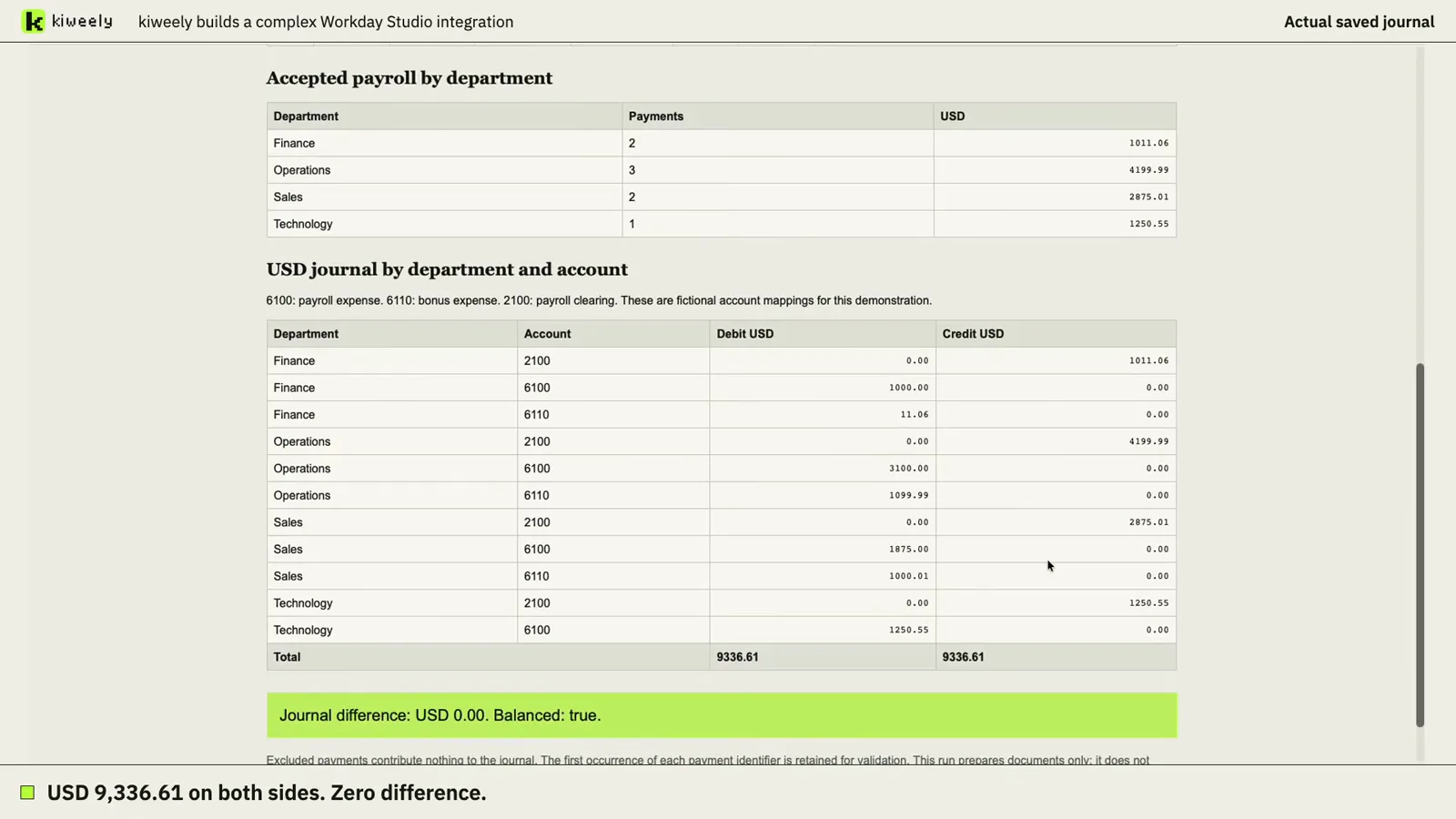
From a plain request, Kiweely Vine builds a multi-currency payroll reconciliation in Workday Studio, tests it, deploys it and runs it in a Workday Development tenant. It repairs the first run, corrects one employee mapping, and the rerun balances at USD 9,336.61 on each side. 83-minute recorded run, setup and checks included.
Watch the film (6 min) · Start for free
Frequently asked questions
Does Kiweely ship a fork of Workday Studio or reverse-engineer Eclipse plugins?
No. Kiweely adds a small plugin into the dropins folder of the Studio you already installed. Studio itself and its public Eclipse APIs perform the editing, building, deploying, launching, and debugging. Kiweely does not ship Workday code.
What binary does Studio deploy to Workday?
Workday calls the deployed binary a CLAR, or Cloud Archive. It packages assembly.xml, XSLT, Text Schema, and any compiled Java into an encrypted Cloud Repository object. Assemblies are designed in the Studio Assembly Editor; the CLAR is what lands in the tenant.
How does Studio sign in when a tenant account has no Workday password?
Kiweely supports three Studio sign-in paths: Workday sign-in with saved username and password details, a Username and password connection, and an OAuth API client with PKCE. If Studio has no usable sign-in, Kiweely raises a card in the conversation and waits until you provide one Studio can use.
What happens if a Studio integration runs longer than two hours?
Workday terminates integrations that take longer than two hours in a Cloud Runtime. Process Monitor then shows a failed or incomplete launch. Design streaming splits and external handoffs so a single launch stays under that ceiling.