A desktop app for Workday developers, consultants and admins
The AI agent that’s signed in to your Workday.
Describe an Extend app. kiweely builds, deploys and tests it, and handles Studio integrations, tenant questions, admin changes and reports. You approve every Workday change.
No integration user or API client to set up · Kiweely Personal is free, no card kiweely runs on your computer: start here, download it there.
Compared with AI chat
ChatGPT tells you the clicks. kiweely makes them.
The same strong AI models underneath. The difference is what they can reach in Workday, and who checks the work.
Put kiweely beside
| The job | ChatGPT or Claude | Coding agents such as Claude Code | kiweely |
|---|---|---|---|
| Answers from your tenant’s real setup | Can’t: No. Training data and the public web | Partly, or only what you set up: Only through an API client and a connector you set up | Does it: Yes, through your own Workday sign-in |
| Makes the change in Workday | Can’t: No. It tells you the clicks | Partly, or only what you set up: Only what the APIs you registered allow | Does it: Yes, after you approve it |
| Extend apps and orchestrations | Partly, or only what you set up: Writes files for you to paste | Partly, or only what you set up: Writes files; checking and deploying are yours to wire up | Does it: Designs, builds, deploys and promotes through Sandbox; Workday checks every version. The first install in a tenant and Production stay yours |
| Workday Studio integrations | Partly, or only what you set up: Writes XSLT for you to paste | Partly, or only what you set up: Edits the files; building, testing and deploying in Studio stay yours | Does it: Builds, tests, deploys, runs and debugs through your own Workday Studio, and asks before each deploy and run |
| Tests as real people | Can’t: No | Can’t: No | Does it: Yes, with Start Proxy in a browser you can watch, and fixes what fails |
| Design documents, test scripts, decks | Partly, or only what you set up: Drafts you copy out | Partly, or only what you set up: The files you ask for | Does it: Written from the real tenant and filed in the project |
| Workday Community and the Developer Forum | Partly, or only what you set up: Public pages only | Partly, or only what you set up: Public pages only | Does it: Reads both, signed in as you |
Workday Extend and Orchestration for Integration
The whole Extend job. You approve.
Describe the app and attach the policy. kiweely designs the model, pages and business process, has Workday check every version, deploys it once you approve, tests it as each person and promotes it.
How far it takes your app.
Development
It deploys each version once you approve it.
DeployedImplementation
It promotes the version, naming every model change first.
PromotedSandbox
It promotes it again, and can test it there as the people who will use it.
PromotedProduction
For safety, kiweely never promotes an app to Production.
You move it there yourself, in Workday’s Developer Site.
An app’s first install in a tenant stays yours too. A model change past Development always waits for you, even with Full Access on.The Extend page
Orchestrations get the same loop.
Moving data between Workday and another system: it builds the orchestration, runs it, and when a run fails, reads Workday’s own run history and logs, fixes the cause and runs it again.
Workday Studio
The whole Studio job, in your own Studio.
New integrations and the ones you inherited. kiweely writes the assembly and the XSLT, builds and tests them in the Workday Studio on your computer, and deploys and runs them once you approve.

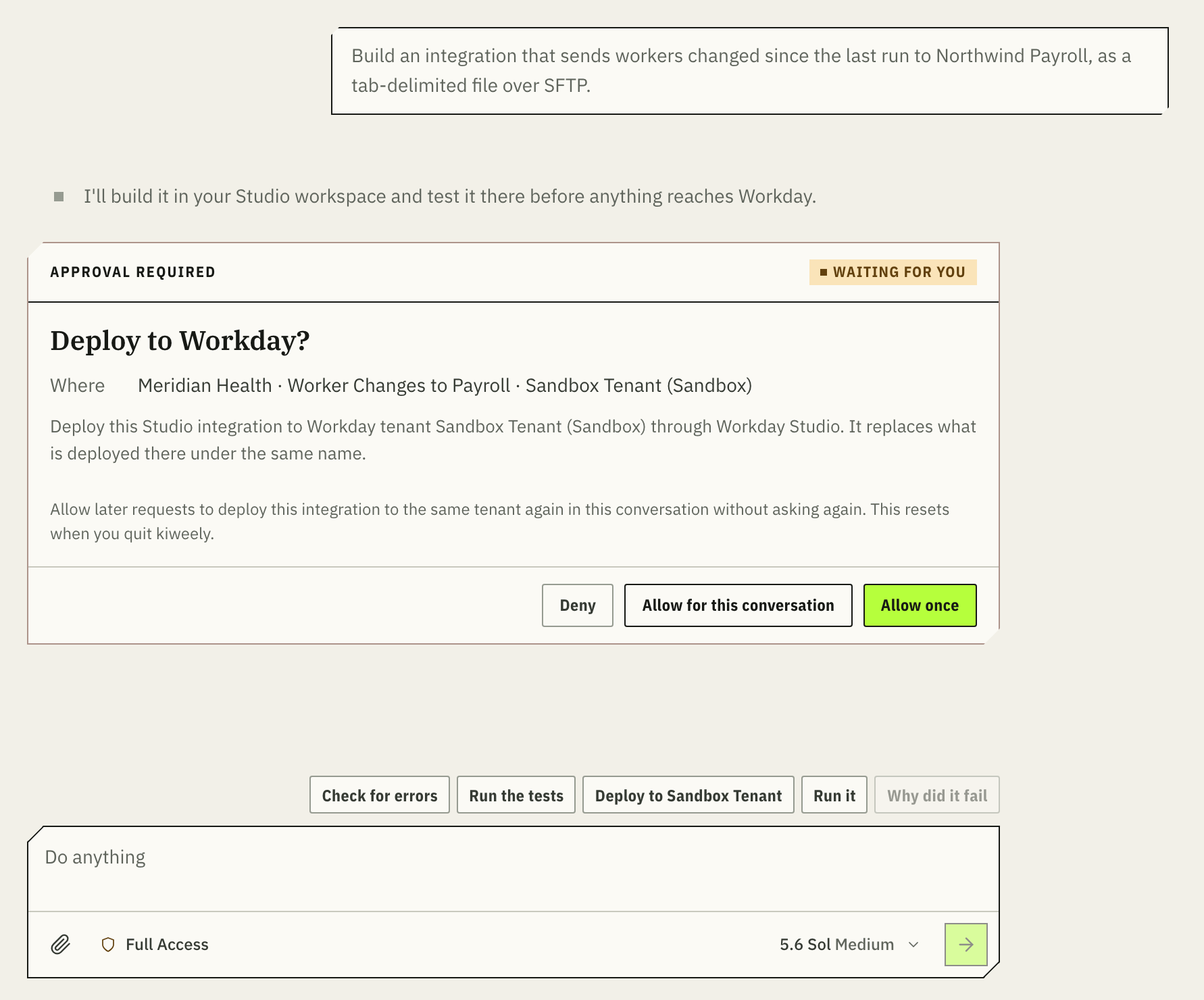
Always under the message box
-
Check for errors
Your Studio builds it; kiweely fixes what Studio reports.
-
Run the tests
It writes a test for every change and runs them all, on your computer.
-
Deploy to Sandbox Tenant
Waits for your yes, and names the tenant.
-
Run it
Waits for your yes, then reads Workday’s report of the run.
-
Why did it fail
It finds the step, replays its real input and proves the fix with a test.
Uses the Workday Studio already on your computer. No Extend account needed.
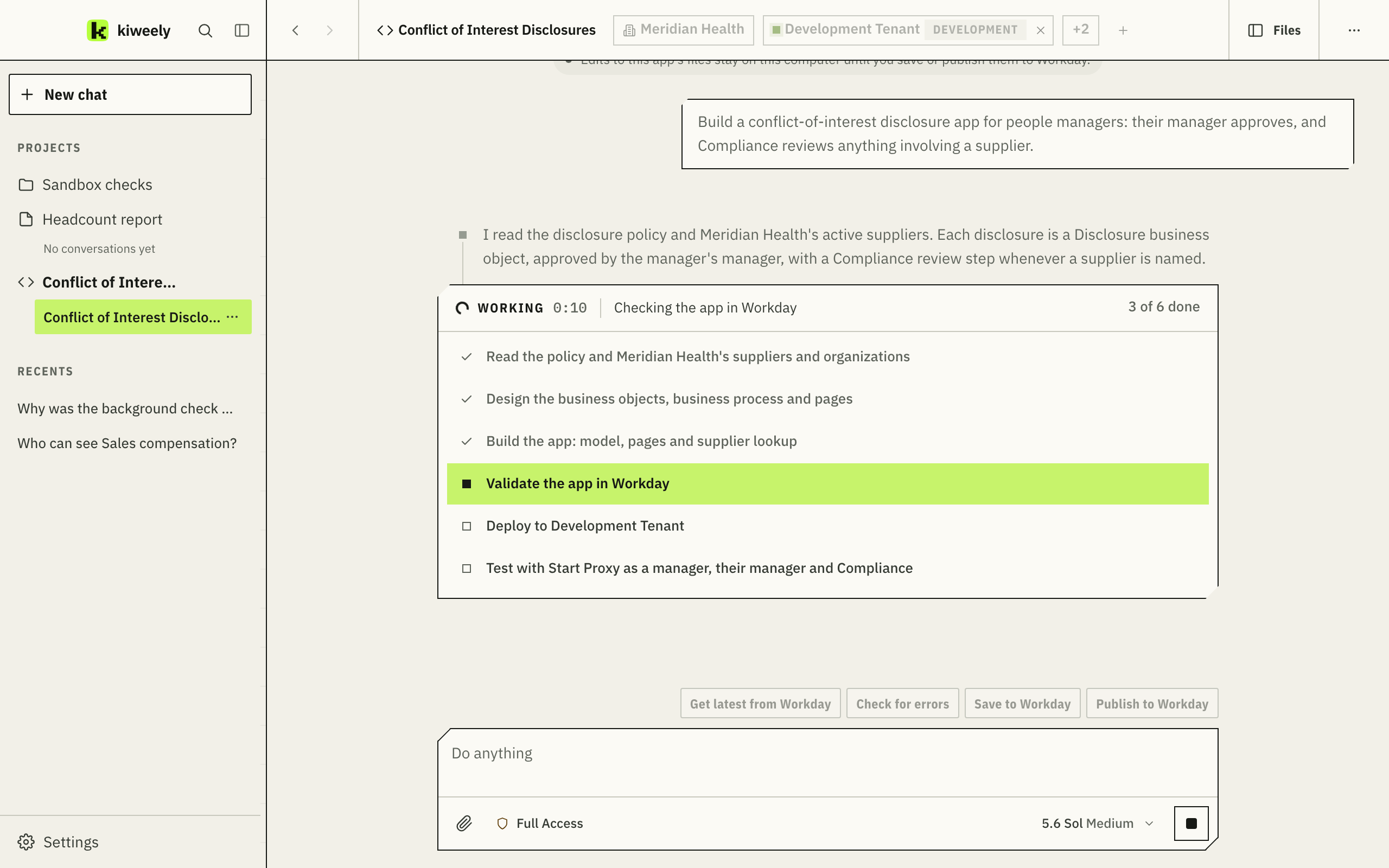
Three ideas, and you know your way around.
It installs on your computer like any app. Your first conversation can show you around: say “Show me around”.
- On the leftConversations and projects
Ask in a conversation. Keep real work, like an Extend app, a Studio integration or a report, in a project with its documents.
- Along the topClients and their tenants
Each conversation works for one client and only ever gets that client’s sign-ins. Tick several tenants to work across them.
- Under the message boxYour AI, your choice of model
It runs on your ChatGPT plan, your Claude plan or an OpenRouter key. Pick the model and effort for each conversation.
Security
Your client’s Workday stays in your hands.
kiweely works from your computer with your own Workday sign-in, so Workday’s security decides what it can see and change. Here is where everything goes.
kiweely, on this computer
Your Workday sign-ins
Kept where this computer keeps your other passwords. Never sent to kiweely or the AI.
Your Workday Studio
Stays your own copy. Only kiweely on this computer can ask it to do anything.
Your client’s Workday
Waits for your yesThe work itself, as you. Every change shows a card naming the tenant and the change, and nothing is saved until you approve it.
Your AI provider
Your own accountWhat you ask, and what it reads to answer you, on your own ChatGPT, Claude or OpenRouter account. Never through kiweely.
kiweely
Your account onlyOnly your email, your connected computers, and crash reports you choose to send. Nothing from your work.
Try it on real work. It’s free.
No card and no trial. The whole product on up to three of your own computers, running on the AI account you already have.
- kiweely
- $0 for one person. A firm agreement is by quote.
- Your AI
- Your ChatGPT plan (Go, Plus, Pro, Business, Edu or Enterprise), your Claude plan (Pro, Max, Team or Enterprise) or OpenRouter credit, billed by them.
- Workday
- Nothing new. Extend apps use the client’s Workday Extend subscription; Studio integrations use the Workday Studio you already have.