


Behind a one-line brief such as “managers nominate employees for spot awards,” a working Extend app is a chain of AMD routes, PMD pages, optional model components, WQL or Graph queries, validation, App Hub save, tenant deploy, security policy setup, and persona proof. An AI agent compresses the typing; it does not skip those Workday gates.
Kiweely Vine runs that chain on your desktop against a connected tenant with consent before writes. Workday Developer Agent can scaffold many of the same artifacts inside App Builder. Both still end at the same platform rules and limits.
Stage Map: Brief to Development Deploy
| Stage | Artifacts | Gate that stops you |
|---|---|---|
| StageIntake | ArtifactsClient, project, acceptance criteria | Gate that stops youAmbiguous actors or missing tenant |
| StageDesign | ArtifactsAMD tasks/routes, PMD pages, scripts | Gate that stops youWidget and endpoint shape mistakes |
| StageData | ArtifactsWQL/Graph queries, business objects | Gate that stops youQuery auth, empty security, wrong BO fields |
| StageAutomate | ArtifactsSync/async orchestrations | Gate that stops you25s page sync ceiling; 48h async ceiling |
| StageValidate | ArtifactsApp Builder / WDCLI validate | Gate that stops youSchema and reference errors |
| StageDeploy | ArtifactsApp Hub version to Development | Gate that stops youAuth, alias, or packaging failures |
| StageSecure | ArtifactsDomains, BP security, Activate Pending Security Policy Changes | Gate that stops youGroups missing View/Modify |
| StageProve | ArtifactsBrowser as manager, worker, admin | Gate that stops youConstrained security surprises |
Keep model components out of the first draft unless the brief truly needs stored custom objects or a custom business process. Presentation-only apps fail cheaper.
What the Agent Actually Authors
From a concrete brief, the agent drafts:
- AMD task entries and routing patterns so
/lands on the home page and subsequent tasks open edit or view pages. - PMD page JSON: headings, inputs, buttons, and endpoints that call WQL, Graph, REST, or orchestrations under SSO where possible.
- Scripts for client-side validation and transforms (respecting script CPU limits).
- Optional model components:
.businessobject,.securitydomain,.businessprocesswhen data must live in Extend rather than only in core Workday objects. - Orchestrations for work that should not block a page beyond 25 seconds.
{
  "id": "home",
  "routingPattern": "/",
  "page": { "id": "nominationHome" }
}
Workday’s own Developer Agent tutorials show the same discipline: generate in chat, review in App Preview or Draft Mode, then Apply Changes before the app definition is durable. Generative output is not deterministic; re-prompting can change field names, so validation is mandatory.
Validation and Deploy Are Separate Events
fails: "Deployed" after chat scaffolding only
  - No Validate run
  - No App Hub save
  - No tenant alias deploy
  - Security domain unchecked

works: Development proof
  1. Validate (zero blocking errors)
  2. Save to App Hub
  3. Deploy to Development tenant alias
  4. Create/adjust domain security policies
  5. Activate Pending Security Policy Changes
  6. Open tasks as Logan (or your test personas)
Component ceilings still apply: among other limits, an Extend app supports up to 20 business objects, 5 business processes, 10 security domains, 20 custom tasks, and 75 presentation pages, with presentation file size and timeout rules documented in Workday’s limits reference. Designing past those caps in chat does not make the platform accept them.
Promotion beyond Development is a different lifecycle. Model components move with Weekly Service Update timing and cannot be removed once promoted. Use model-components-first deploy guidance and app promotion before touching Implementation or Sandbox.
Security Setup After the Bits Land
Deploy does not grant access. After the Development tenant has the app version:
- Confirm each security domain the app declared (for example page security and object permissions).
- Open Edit Domain Security Policies (or create the policy if the domain is new) and grant the intended groups View / Modify as designed.
- Run Activate Pending Security Policy Changes.
- Only then proxy or sign in as a manager in a constrained supervisory organization.
Agents that stop at “deploy succeeded” leave you with a green App Hub row and a blank task for every real user. Workday’s Developer Agent documentation is explicit that it does not configure security for you; Kiweely Vine can help execute those tenant steps with consent, but the Activate Pending step remains a Workday control point you must see succeed.
Browser Proof Is Part of the Build
A deploy that only loads for an unconstrained ISU is not done. The agent should drive a visible, stoppable browser as the personas named in the brief: nominating manager, nominee (if self-service views exist), and HR partner under constrained orgs. Capture failures against Extend pages errors and validation errors rather than rewriting the specimen by hand.
For end-to-end patterns, follow test a Workday Extend app end to end. Watch filmed builds on /vine/films. Pricing for personal developer practice versus firm seats is on /pricing. Vine Free is free for your Workday personal developer account and its tenant. Any other tenant needs Vine Personal at $99 a month for one person, or a Vine Team seat at $149 a month.
Worked Example: Spot Award Nomination Brief
Brief: “Managers nominate a direct report for a spot award with amount, justification, and HR partner review.”
Behind the scenes the agent should produce roughly:
- Home PMD plus nomination edit PMD with amount and justification fields.
- WQL or Graph query limited to the manager’s team under SSO.
- Optional business object if award history must persist outside core compensation.
- Sync orchestration only if the submit path returns immediately; otherwise async after BP completion.
- Security domain enabling page access for Manager and HR Partner groups.
- Browser proof: manager in Org A can nominate; manager in Org B cannot see Org A’s workers; HR Partner receives My Tasks.
If the first generate invents a field name the business object does not have, Validate fails, the agent repairs, and you re-deploy. That iteration is expected. Shipping the first draft without Validate is how “AI built an app” demos die in Implementation.
What You Should Tell Stakeholders Happened
Say the brief became a validated Development app with named pages, queries, and (if any) model components, then show persona evidence. Do not say “AI deployed to Production” unless a human deliberately promoted and secured that path. Do not count objects from memory; read them from the last validate or deploy result. The behind-the-scenes work is mostly Workday’s lifecycle. The agent’s contribution is staying inside that lifecycle until the page opens for the right worker.
Watch Kiweely Vine build and test an Extend app
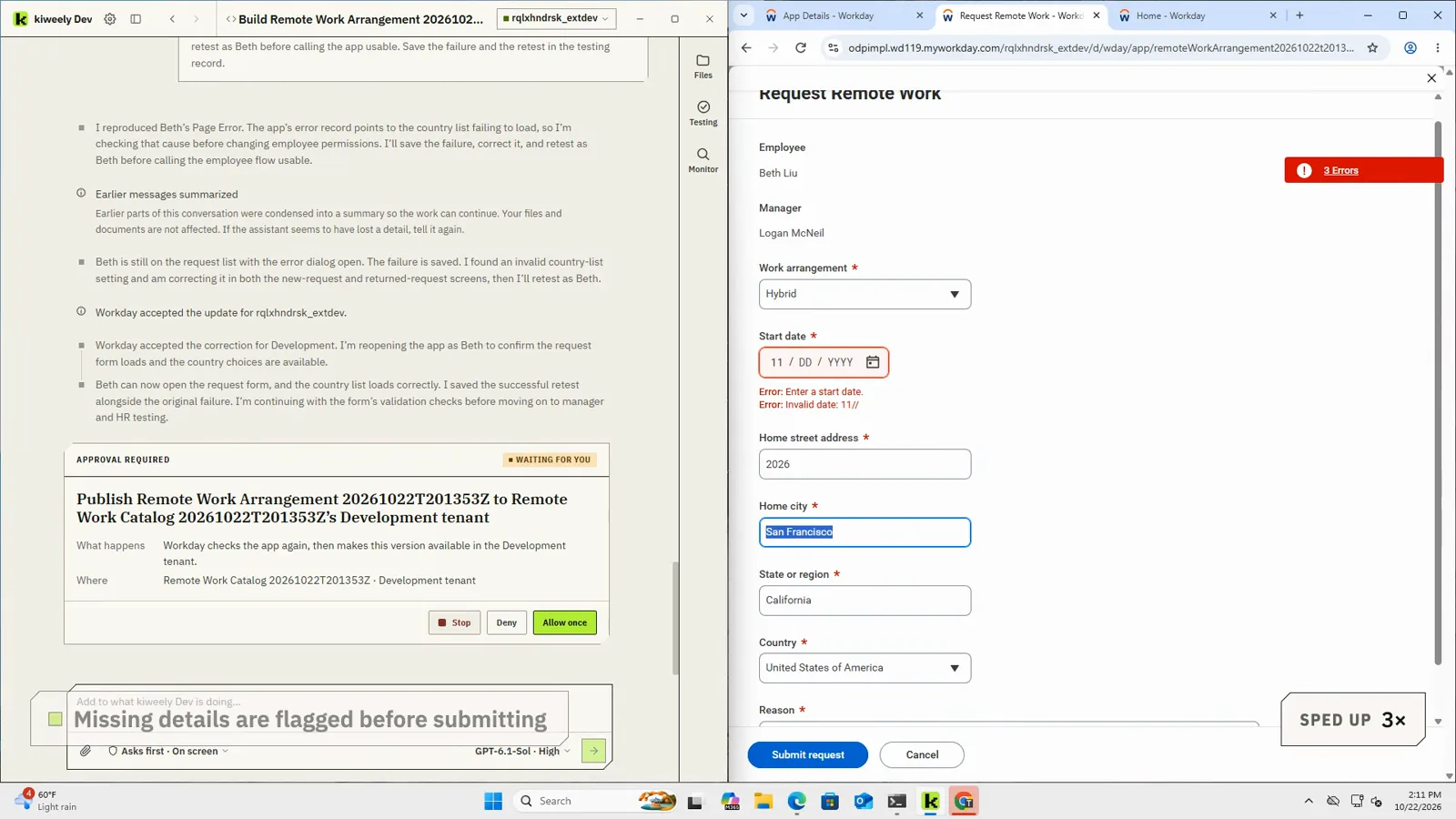
A consultant describes a remote work request app in plain business words. Kiweely Vine builds it, publishes it to a Workday Development tenant and tests it as the employee, the manager and HR: employees ask to work remote or hybrid, managers approve or send back with a comment, and HR sees one list of who works where. About two hours of real work, shown in 13 minutes. Every acceptance check passed in Development.
Watch the film (13 min) · Start for free
Frequently asked questions
Does generating PMD JSON mean the app is deployed?
No. Generation creates or updates app components in App Builder or the local project. You still validate, save to App Hub, deploy to a tenant alias, configure security domains, and verify pages as real personas.
Why do model components need extra caution before leaving Development?
Business objects, business processes, and security domains promoted beyond Development follow Workday Weekly Service Update timing and cannot be deleted once shipped. Prefer non-model fixes when the brief does not truly need new objects.
Can I try this path on a free personal developer tenant?
Yes. Workday's Open Developer Program provides a free personal developer account and Development tenant. Vine Free is free for that personal developer account and its tenant; any other tenant needs a paid Personal licence or Team seat.
What proves the app works after deploy?
Open the deployed tasks as the intended security groups, submit a transaction, confirm My Tasks routing, and check orchestration or page errors. Screenshots and notes under the project Testing folder record what you saw; they are not a substitute for tenant evidence.