Every Workday consultant, report writer, and integration developer knows the feeling.
You get a seemingly straightforward business requirement: "Show the oldest dependent's last name on the worker profile" or "Flag any manager whose direct reports have unsubmitted timecards older than 14 days."
In modern programming languages, that is two lines of code. In Workday, it means descending into the labyrinth of Calculated Fields.
1. The reality of Workday calculated fields: powerful, ubiquitous, and painful
Calculated fields are the functional programming engine of Workday. They power nearly every corner of every module:
- Core HCM and Compensation: Eligibility rules, total rewards statements, and compensation package matrix evaluations.
- Financials and Procurement: Spend category rollups, tax rule conditions, and accounting journal validations.
- Payroll and Benefits: Deduction thresholds, ACA reporting, and benefit election rules.
- Business Processes and Security: Condition rules for BP routing, approval step skips, and segment-based security.
- Integrations and Extend: Custom EIB delivery transforms, Studio integration parameters, and custom Extend app data models.
Yet creating calculated fields is one of the most tedious, error-prone tasks in enterprise software.
Workday enforces a strict relational Business Object hierarchy. You cannot simply reach across objects; you have to construct tiered dependency chains:
- Extract Single Instance (ESI) to isolate the target record from a 1:M relationship (for example, finding the oldest dependent from a worker's dependents collection sorted by date of birth).
- Lookup Related Value (LRV) to pull a specific field from that isolated instance.
- True/False Conditions (TF) or Evaluate Expression (EE) to handle edge cases, null values, or conditional routing.
- Format Date / Text / Arithmetic fields to format the output for consumption.
A single misaligned business object, an incorrect sort order, or an unrecognized cardinality mismatch breaks the entire chain. And Workday rarely explains why—the field simply returns blank.
2. Why traditional chatbots fall short
When generative AI arrived, many hoped asking ChatGPT or Claude would solve the calculated field grind. In practice, generic chatbots fail to deliver on three counts:
- Zero Tenant Context: Generic chatbots do not know your tenant's data dictionary, your custom business objects, your security groups, or which custom fields already exist. They offer generic advice that often references non-existent fields.
- The "Click Path" Trap: Instead of building the field, a chatbot hands you a 20-bullet manual recipe: "Step 1: In the search bar, type 'Create Calculated Field'. Step 2: Select Business Object 'Worker'..." You are still stuck doing all the mechanical clicking.
- The Blank Field Dilemma: When the calculation yields an empty column in your report, a chatbot cannot help you debug. It cannot see your tenant, inspect live records, or diagnose whether the issue is an ESI filter or an empty source relationship.
Generic screen-based vision models are equally fragile: Workday's dynamic DOM, deep modal grids, and prompt menus frequently cause screen-based bots to misclick or stall.
3. How kiweely solves calculated fields at the root
kiweely approaches the problem differently. It is not an external chatbot dispensing instructions—it is an AI agent running on your computer that securely performs the work directly in your Workday tenant, with your consent.
- Direct Tenant Intelligence: Connecting through your own Workday sign-in, kiweely inspects the live data source, business objects, and existing fields directly. It understands the underlying metadata rather than guessing from screen pixels.
- Multi-Tier Dependency Assembly: You provide the requirement in plain English. kiweely figures out the dependency graph—whether it requires an ESI, an LRV, a date difference, or a nested Evaluate Expression—and creates each component field in sequence.
- Closed-Loop Live Verification: Once kiweely builds the fields, it does not just assume they work. It queries the tenant (using live WQL queries) against real worker records to verify that the field returns the exact expected data before reporting the job complete.
- Human-in-the-Loop Safety: Every change to the tenant requires your explicit approval. You see what kiweely plans to create before it creates it.
4. Step-by-step: creating a calculated field with kiweely
Here is how creating a multi-tiered calculated field works in kiweely.
Step 1: Connect your tenant and describe the requirement
You open kiweely, sign in to your development or sandbox tenant, and state your goal in plain English:
"Create a calculated field on Worker that returns the oldest dependent's last name."
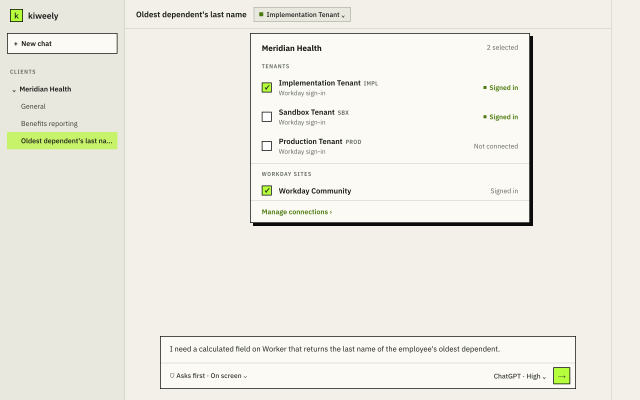
Step 2: Planning the dependency chain
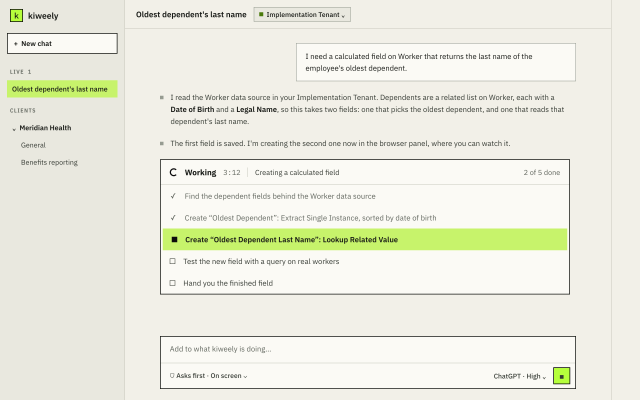
kiweely inspects the Worker business object and its Dependents relation. It plans the two-step
sequence:
- Create an Extract Single Instance (ESI) on
Worker, targetingDependents, sorted byDate of Birthin ascending order, returning the first instance. - Create a Lookup Related Value (LRV) on
Worker, referencing that ESI, pulling theLast Namefield from the dependent's personal information.
Step 3: Automated build and live execution
With your approval, kiweely executes the configuration tasks in the tenant, configuring the prompt fields, operators, and return values.
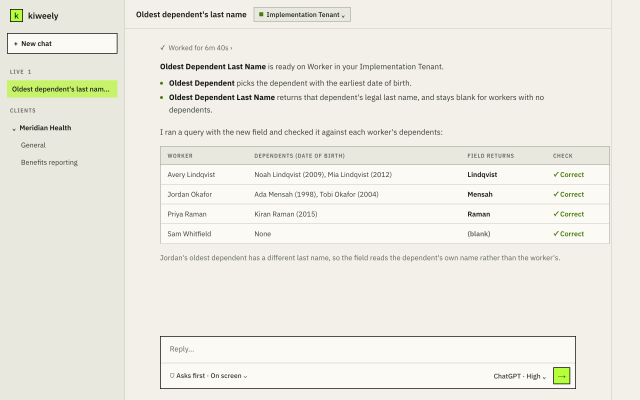
Step 4: Live proof and verified results
Immediately following creation, kiweely runs a live query comparing the source worker's actual dependents with the output of the new calculated field, confirming that the logic holds for real records.
Watch kiweely build a complex calculated field from start to finish: https://youtu.be/aHnNpdrkTdA
5. The growth mindset: shifting from UI mechanic to solution architect
Workday professionals spend countless hours building and rebuilding calculated fields, hunting through prompt menus, and debugging blank outputs.
Embracing agentic tools elevates human expertise:
- From Mechanical Clicker to Enterprise Architect: When the friction of creating multi-tier calculated fields drops to seconds, you can focus on data governance, business rules, and high-impact architecture.
- Fearless Iteration: Because testing is automated and grounded in live tenant verification, you can prototype complex business logic and edge cases in minutes rather than days.
- Higher Delivery Velocity: Deliver complete reports, integrations, and Extend applications in a fraction of the time, eliminating the backlog of mundane configuration tickets.
The future of Workday consulting is not about memorizing click paths. It is about designing solutions with the leverage of AI agents that actually do the work.
Try it free
Kiweely Personal is free for one person to try on this computer: every feature, no card, no trial, using the ChatGPT or Claude plan you already own.
Download kiweely at https://kiweely.com.