


Start with a real task
Suppose an HR team needs a small Workday Extend app to collect a manager’s response to an internal request. The requirement is not just a screen. It includes who can open it, what data is saved, what happens when a required answer is missing, and what the manager sees after submission. Workday describes Extend’s lifecycle as build, test, verify, and release; an attractive draft covers only the first part. See Workday’s Extend overview.
In kiweely, start a Claude conversation in the right project and connected tenant. Describe the business outcome, the intended users, and the environment. Ask for a design before changes are made. You can connect your Claude subscription in Settings if you have not done so yet.
From a draft to Workday’s answer
Claude Code can reason about the request and write source files. In a standalone coding session, that is still a draft: it has not proved that your tenant accepts the app or that your users can complete the task. In kiweely, the Claude conversation can use the product’s Workday connections and Extend tools to carry the work forward in the same project.
- Review the proposed design, pages, data, and roles against the request.
- Let the agent create or revise the app source in the project.
- Ask it to validate the app with Workday and show the exact result or error.
- Review any requested upload or deployment action before allowing it.
- Open the deployed app as the intended user and test the behavior and saved data.
Workday’s own deployment prerequisites call for development and testing in a Development tenant before installation elsewhere. A successful source edit or build does not stand in for tenant testing.
Prove the task, not the demo
Run the main path, a missing-answer path, and a role that should not have access. Confirm what was actually saved by reading it back. If a page fails in the browser, repair it and repeat that path. Keep the environment clear throughout: a result from Development is not proof of behavior in Production. Our Extend testing guide has a fuller checklist.
This is what tenant access changes. Claude remains the reasoning engine, but Workday supplies the validation, runtime behavior, and saved result. kiweely puts the connected tools and approval steps around the Claude conversation. A completion claim should say which steps were actually run and which still need a person or another environment.
Watch Kiweely Vine build and test an Extend app
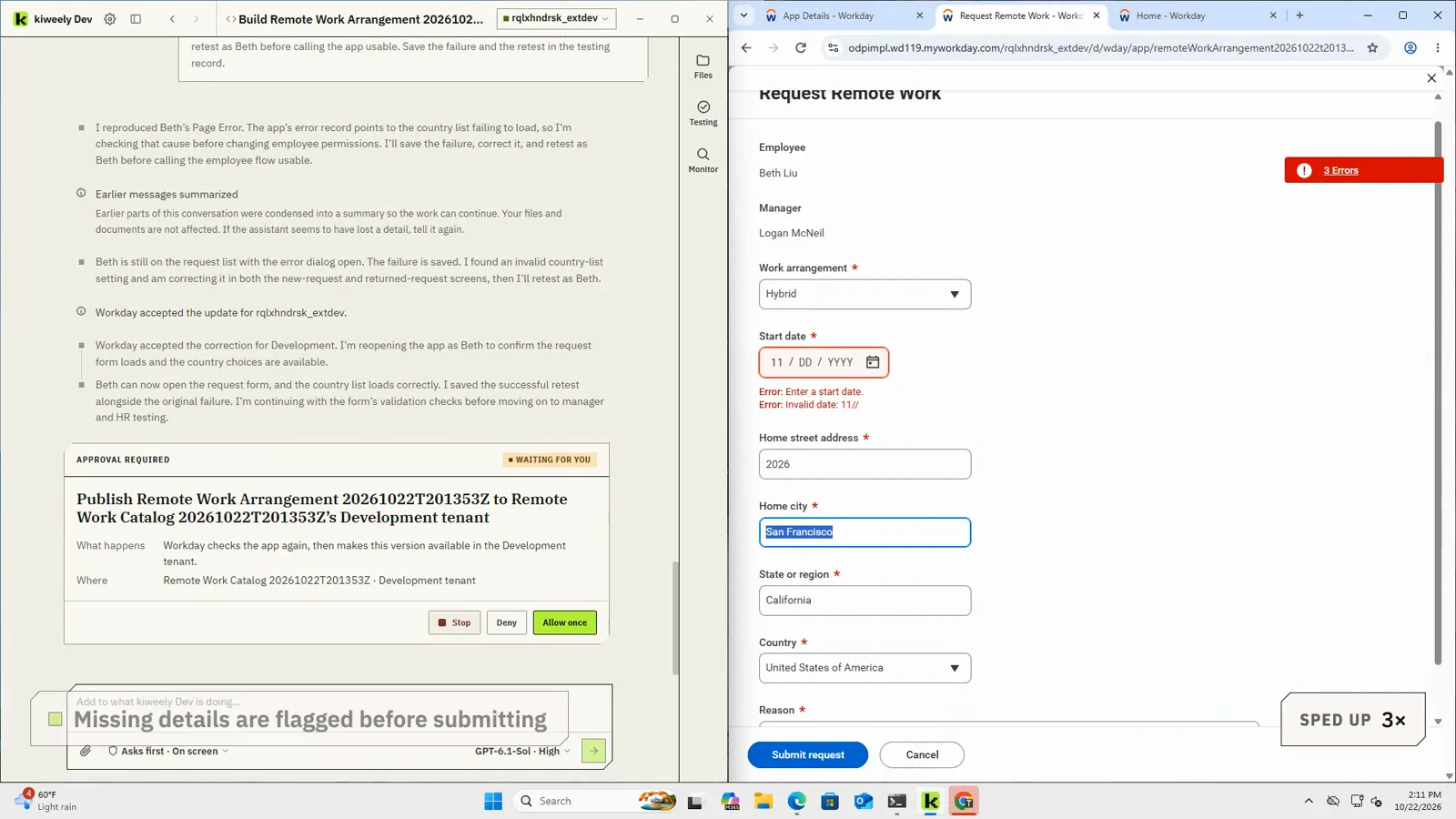
A consultant describes a remote work request app in plain business words. Kiweely Vine builds it, publishes it to a Workday Development tenant and tests it as the employee, the manager and HR: employees ask to work remote or hybrid, managers approve or send back with a comment, and HR sees one list of who works where. About two hours of real work, shown in 13 minutes. Every acceptance check passed in Development.