


People ask us the same question in three ways: is there a Workday plugin for ChatGPT, does Claude have a Workday connector, can Gemini read our Workday? We made an 8-minute film that answers all three, then walks through every route that exists. It has no voice: captions carry the words, and every fact is shown on the company’s own page or in our own Workday Development tenant.
Watch the film
Play the filmEverything below is as of 17 November 2026. For the full written comparison, with every source and date, read Claude, ChatGPT and Gemini with Workday: every option compared.
The short answer, assistant by assistant
- Claude: Workday’s own agent, Sana, is in Beta there, and any remote MCP server can be added as a custom connector.
- ChatGPT: there is no Workday app. It takes a custom MCP server.
- Gemini Enterprise: Workday’s Sana today. Its custom MCP server data source is in public preview.
- Microsoft 365 Copilot: Sana, or Microsoft’s own Workday pack.
Five routes on one map
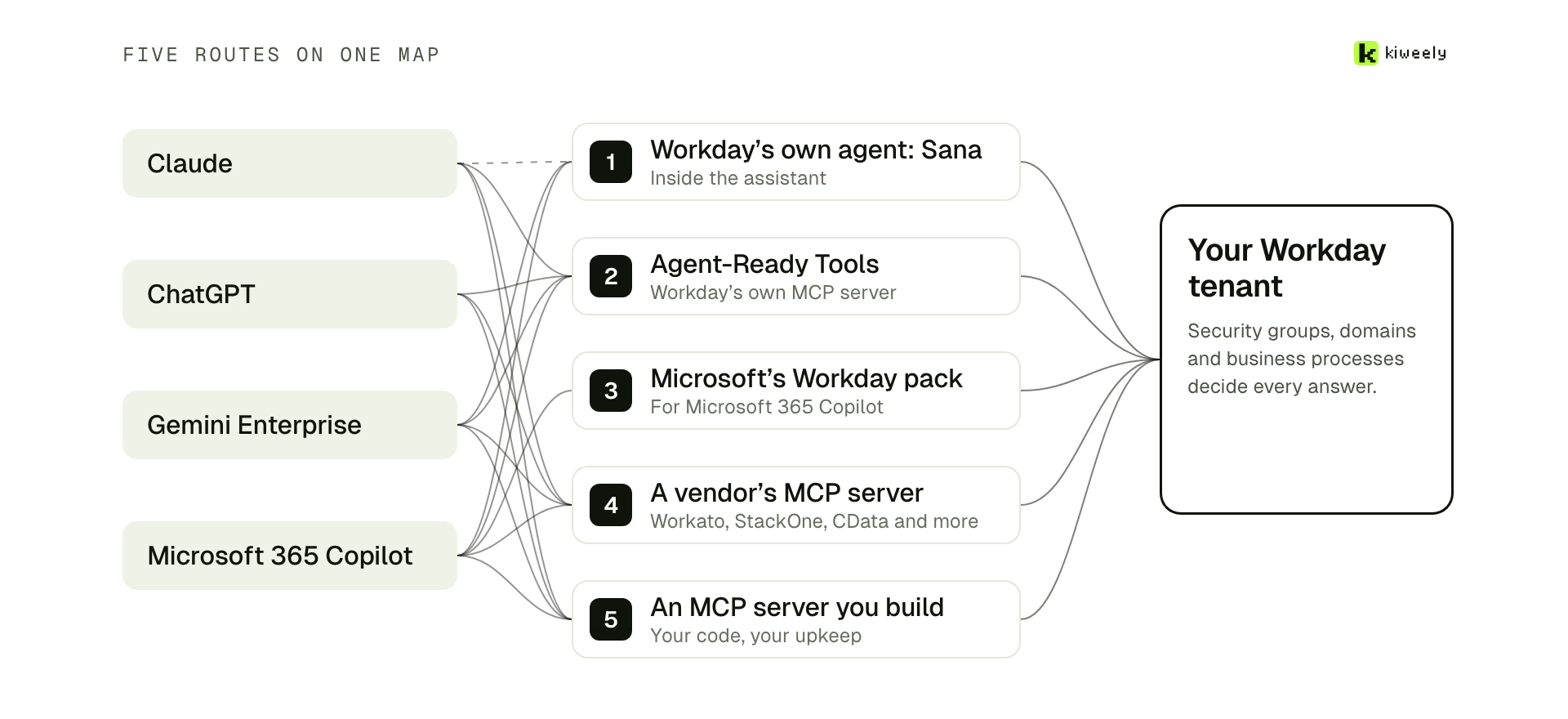
Behind those answers are five routes, and most of them use MCP, the Model Context Protocol, the standard way an assistant calls outside tools:
- Workday’s own agent, Sana, inside the assistant.
- Agent-Ready Tools, Workday’s own MCP server.
- Microsoft’s own Workday pack for Copilot.
- A vendor’s managed Workday MCP server.
- An MCP server you build yourself.
The film holds each route to the same five questions: which assistants it reaches, whose Workday access the AI gets, what it can change, what it costs and how ready it is.
In the film: from 0:39.
Route 1: Sana, Workday’s own agent
On 13 October Workday announced self-service Sana as generally available in Gemini Enterprise, Microsoft Copilot, Teams and Slack. In Claude it is “Sana from Workday”, a Beta service made by Workday, which Workday expects to be generally available in late 2026. Each request follows the roles, permissions and approval chains already set in Workday. It needs a Workday UMSA and agents set up in Agent Management Hub. Neither the announcement nor Claude’s listing mentions custom reports or WQL. It is paid in Workday Flex Credits: 1 per self-service read and 5 per write, and Workday publishes no dollar price per credit.
In the film: from 1:28.
Route 2: Agent-Ready Tools, Workday’s MCP
Agent-Ready Tools are Workday’s own MCP tools, reached through its Agent Gateway, and any MCP client can call them. Workday’s admin guide sets them up in five steps in your tenant, ending with security policies for agent skills. The agent signs in with an OAuth authorization code, as the person: access tokens last 4 hours and refresh tokens 30 days. The rate card prices them at 10 Flex Credits per 100 base calls and 50 per 100 advanced calls that make changes. More in Does Workday have an MCP server?
In the film: from 2:33.
Route 3: Microsoft’s Copilot pack
Microsoft’s Employee Self-Service agent has a Workday extension pack. Its simplified set-up connects through a single OAuth connection as the signed-in user, so there is no integration system user: every Workday call runs as the person asking. It reads employee details and updates phone, email and time off. More in Microsoft Copilot and Workday.
In the film: from 3:29.
Claude, ChatGPT and Gemini on their side
For routes 4 and 5, each assistant adds an MCP server its own way. Claude adds any remote MCP server as a custom connector, one on the Free plan, and connects from Anthropic’s cloud, so the server must be reachable over the public internet. ChatGPT has no Workday app; it reaches Workday through a custom MCP server, and its write actions ask for confirmation by default. Gemini Enterprise’s list of data sources has no Workday, but its public preview sources include Custom MCP Server. More in Is there a Workday plugin for ChatGPT? and Gemini Enterprise and Workday.
In the film: from 4:00.
Routes 4 and 5: vendors, or your own server
A dozen vendors sell Workday tools for MCP clients, and the first thing to check is whose sign-in each call uses. Some sign each person in on Workday; Glean uses one integration system user. StackOne holds writes and deletes for sign-off, while others expose tools such as terminate worker. Of the open-source servers on GitHub we reviewed, none says it has been proven on a production tenant. If you build your own, the MCP specification forbids passing the assistant’s token through to Workday, so per-person access means your own OAuth layer and a Workday token for each person. More in Open-source Workday MCP servers, reviewed.
In the film: from 4:57.
Whose access does the AI get?
In Workday this comes down to which kind of API client you register, and the film shows both in our Development tenant. Register API Client with Authorization Code Grant removes the Integration System User field: each person signs in as themselves, with a 30-day refresh token. Register API Client for Integrations works from one account’s token, and its refresh tokens don’t expire, so everyone in the chat gets that account’s access whatever their own role. For an assistant every employee talks to, that is the wrong default. Signed in per person, every request passes four gates set by different teams: the assistant, the connector’s tools, the Workday API client and Workday’s own security. More in How to secure a Workday MCP server.
In the film: from 5:52.
Reads go through, changes wait for a yes
A read runs as the person and shows only what they can already see. A change should stop for the person’s yes somewhere the chat can’t answer for them. Start read-only and turn changes on one at a time.
In the film: from 6:54.
Which route fits
- Self-service in Copilot, Teams, Slack or Gemini Enterprise, on a UMSA: start with Sana.
- Building agents on Extend AI: Agent-Ready Tools, budgeted per 100 calls.
- On Microsoft 365 Copilot and want Microsoft’s own agent: its Workday pack.
- Your company uses Claude and self-service is enough: apply for Sana in Claude.
- Several assistants, custom reports or WQL, on any tenant: a per-person MCP connector.
In the film: from 7:13.
The last case, several assistants with custom reports or WQL, is what we are building: Kiweely Bridge, coming next. Each person signs in as themselves, it is read-only by default, every change waits for a click and nothing is stored.
Frequently asked questions
Can ChatGPT connect to Workday?
Not through a Workday app: we found none as of 17 November 2026, and Workday's October announcements don't name ChatGPT. ChatGPT reaches Workday through a custom MCP server, such as Workday's Agent-Ready Tools, a vendor's server or your own.
Does Claude have a Workday connector?
Yes. Sana from Workday is in Claude's connector directory as a Beta service made by Workday. It needs a Workday UMSA and agents set up in Agent Management Hub. Claude can also add any remote MCP server as a custom connector.
Whose Workday access does the AI get?
It depends on the API client you register in Workday. Register API Client with Authorization Code Grant signs each person in as themselves. Register API Client for Integrations works from one account's token, so everyone in the chat gets that account's access.