


The short answer: there are five real routes from Claude, ChatGPT or Gemini to Workday. Workday’s own agents (Sana) work inside Microsoft 365 Copilot, Teams, Slack and Gemini Enterprise today and inside Claude in early access. Workday’s own MCP tools (Agent-Ready Tools) let any MCP client in, on Workday’s AI subscription terms. Microsoft has its own Workday pack for Copilot. Vendors sell managed Workday MCP servers. And you can build your own. They differ in five ways that matter: which assistant they reach, whose Workday access the AI gets, what it may change, what it costs, and how ready it is.
Everything below was checked against each company’s own page on 17 November 2026. Where two Workday pages disagree, both are given with their dates.
The options at a glance
| Option | Reaches | Whose access | Changes | Cost (public) | Status, 17 Nov 2026 |
|---|---|---|---|---|---|
| OptionSana Self-Service Agent | ReachesMicrosoft 365 Copilot, Teams, Slack, Gemini Enterprise | Whose accessThe employee’s own Workday permissions | ChangesSelf-service writes such as time off and personal details | Cost (public)Flex Credits: 1 per read request, 5 per write | Status, 17 Nov 2026Generally available (Workday, 13 Oct) |
| OptionSana from Workday in Claude | ReachesClaude | Whose accessWhat the user is allowed to see | ChangesSupported self-service actions | Cost (public)Not published | Status, 17 Nov 2026Beta in Claude’s directory; early access, GA expected late 2026 (Workday) |
| OptionAgent-Ready Tools (Workday’s MCP) | ReachesAny MCP client: Claude, ChatGPT, Gemini, Copilot Studio | Whose accessThe signed-in person (OAuth authorization code) | ChangesYes, by tool | Cost (public)Flex Credits: 10 per 100 base calls, 50 per 100 advanced calls | Status, 17 Nov 2026GA in Extend AI (13 Oct); admin guide says “for Extend Professionals only” (13 Nov) |
| OptionMicrosoft Employee Self-Service agent, Workday pack | ReachesMicrosoft 365 Copilot | Whose accessThe signed-in employee, one OAuth connection | ChangesPhone, email, time off | Cost (public)Copilot licensing | Status, 17 Nov 2026Simplified set-up documented 3 Nov |
| OptionManaged MCP vendors (Workato, StackOne, CData, Merge and others) | ReachesMost MCP clients | Whose accessVaries: per-user sign-in or a shared account | ChangesVaries by vendor | Cost (public)Plans from free to custom | Status, 17 Nov 2026Live |
| OptionBuild your own MCP server | ReachesAny MCP client | Whose accessPer-user only if you build the OAuth layer | ChangesWhatever you build | Cost (public)Engineering and upkeep | Status, 17 Nov 2026Up to you |
| OptionKiweely Bridge | ReachesClaude, ChatGPT and Gemini | Whose accessEach employee signs in on Workday | ChangesOnly what the admin turns on, each confirmed in the browser | Cost (public)$499, $1,499 or $3,999 a month per company | Status, 17 Nov 2026Coming next |
What does Workday offer itself?
Workday has three pieces, and they are easy to mix up.
The Sana Self-Service Agent, where employees already work. Workday’s 13 October 2026 release says self-service Sana is “generally available today in Google Cloud’s Gemini Enterprise, Microsoft Copilot, Microsoft Teams, and Slack”. In Microsoft 365 Copilot it went generally available on 13 May 2026 “for eligible Workday and Microsoft customers”, with “no separate login” and “no additional licensing requirement” on the Microsoft side. Employees check time-off balances, view payslips, review tax withholding, update personal information and request leave; managers approve timesheets in bulk, start performance reviews and submit payroll input. On Workday’s Flex Credits rate card (updated 5 November 2026) each self-service read request costs 1 credit and each write 5. Workday publishes no dollar price per credit.
Sana from Workday in Claude. Claude’s connector directory lists it as “a Beta service” made by Workday. It needs an active Workday Universal Main Subscription Agreement (UMSA) and the relevant agents configured in Agent Management Hub; Workday admins apply for access through a form. Workday’s 13 October release calls it early access, expected to be generally available in late 2026, and says admins connect once with no per-user set-up. What it covers today is HR and finance self-service: pay and time off, policy questions, expenses and approvals. Neither Claude’s listing nor Workday’s release mentions your custom reports, WQL or custom objects, so ask Workday before you count on them. More in Sana in Claude or a connector of your own.
Agent-Ready Tools, Workday’s MCP for outside agents. These are Workday’s own MCP tools, reached through its Agent Gateway. Workday’s 13 October release says they are “generally available in Workday Extend AI”. Workday’s admin guide page Connect an External Agent with Workday MCP, last updated 13 November 2026, still says “This functionality is for Extend Professionals only.” UMSA customers have it switched on; MSA customers enable it through Innovation Services. The set-up runs: set up Agent System of Record, discover the tools, register the external agent, configure it, and configure security policies for agent skills. Sign-in is an OAuth authorization code, so the agent acts as the person who signed in; access tokens last 4 hours and refresh tokens 30 days. On the rate card an outside agent pays 10 credits per 100 base tool calls (reading data) and 50 per 100 advanced calls (transactions). The full answer is in Does Workday have an MCP server?
Who it suits: a company on UMSA that wants employee self-service in Copilot, Teams, Slack or Gemini Enterprise should look at Workday’s own agent first. It is Workday’s product, inside Workday’s own security and audit.
What can each assistant do on its side?
Claude adds any remote MCP server as a custom connector on Free (one connector), Pro, Max, Ultra, Team and Enterprise. On Team only Owners and Primary Owners add them; on Enterprise also a custom role with Manage access to Libraries. Claude connects from Anthropic’s cloud, not the person’s laptop, so the server must be reachable from the public internet on port 443 (or allow Anthropic’s IP ranges). A server behind a VPN will not connect. The steps are in How to connect Claude or ChatGPT to Workday.
ChatGPT has no Workday app that we could find as of 17 November 2026, and none of Workday’s October announcements names ChatGPT. It reaches Workday through a custom MCP server added on ChatGPT on the web. OpenAI’s developer mode page says tools without the readOnlyHint annotation count as writes and “by default require confirmation”, and it offers a Secure MCP Tunnel. More in Is there a Workday plugin for ChatGPT?
Gemini Enterprise has no Workday connector in Google’s list of third-party data sources; a Custom MCP Server data store is in public preview. What runs in Gemini Enterprise today is Workday’s own Self-Service Agent. More in Gemini Enterprise and Workday.
Microsoft 365 Copilot has two Workday routes of its own besides Workday’s agent. Microsoft’s Employee Self-Service agent with its Workday extension pack moved to a simplified set-up (page updated 3 November 2026) that connects “using the signed-in user’s identity through a single OAuth connection”, with no integration system user. It reads employee details and updates phone, email and time off, and Microsoft’s upgrade guide says it supports employees only: “External staff and non-employees aren’t supported.” Copilot Studio also has a Power Platform Workday connector. More in Microsoft Copilot and Workday.
Which third-party connectors exist?
A dozen vendors now sell Workday tools for MCP clients. The difference that matters most is whose Workday access each call uses.
| Vendor | Workday reach | Sign-in | Price (public) |
|---|---|---|---|
| VendorWorkato Workday End User MCP | Workday reach9 self-service reads; submit, cancel and approve time off | Sign-in“Each user individually through their own Workday login”, no integration system user | Price (public)Workato plans |
| VendorStackOne | Workday reach162 prebuilt Workday actions | Sign-in“Every call goes through per-user OAuth 2.1”; StackOne stores and refreshes the tokens; writes held for sign-off | Price (public)Starter free, Team $600 a month, Enterprise by quote |
| VendorCData Connect AI | Workday reachSQL over Workday data | Sign-inThe assistant uses a CData token | Price (public)$99 a month (1 user, 1 source), Growth $199 |
| VendorMerge Agent Handler | Workday reach56 Workday tools, including create, update and terminate worker and time off | Sign-inOAuth through Magic Link, or your own OAuth app | Price (public)Usage-based |
| VendorGlean | Workday reachPeople data and help articles; time-off requests from Glean Assistant | Sign-inOne integration system user | Price (public)Glean plans |
Composio, Zapier, Knit, Apideck, Unified.to and Pipedream also list Workday tools; read each one’s sign-in model before you connect it. The open-source servers on GitHub are reviewed in Open-source Workday MCP servers: none says it has been proven on a production tenant.
Whose Workday access does the AI get?
This is the question that decides whether an option is safe for every employee. There are two kinds of Workday API client:
- Per-user sign-in. An API client with the authorization code grant. Each person signs in on Workday, and every call runs under their own security groups and domains. Workday’s MCP, Microsoft’s simplified Copilot pack and Workato’s End User server all work this way.
- One shared account. An API client for integrations with an integration system user. Everyone who uses the chat gets the integration system user’s access, whatever their own role is.
AI answers still tell people to create an integration system user for this. For an assistant that employees talk to, it is the wrong default. The MCP specification adds one more rule for anyone building: an MCP server must validate tokens issued for itself and must not pass the client’s token through to Workday. So per-user Workday access means running your own OAuth layer and holding a separate Workday token per person.
Every request then passes four gates, each set by a different team:
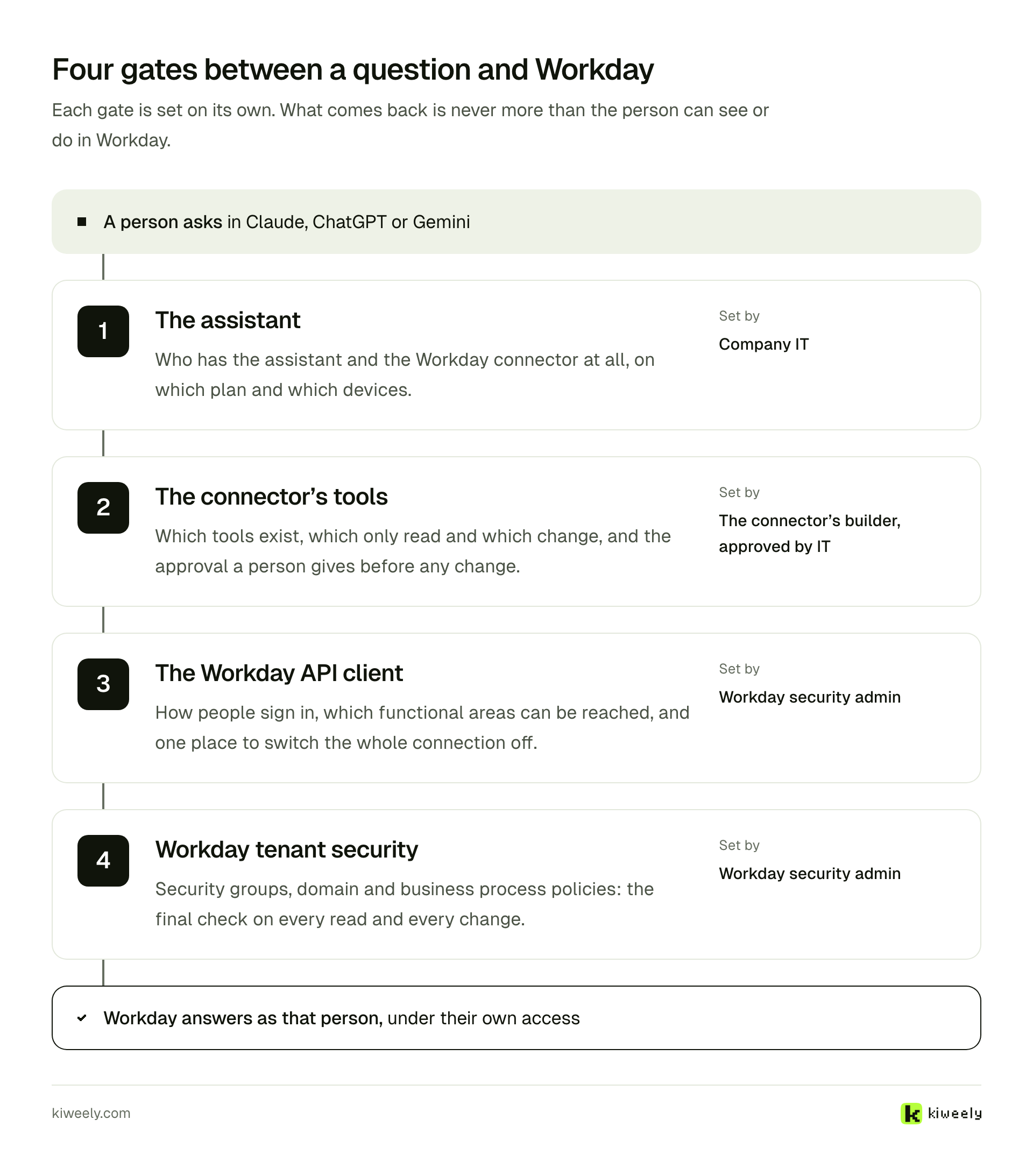
The result is never more than the person can see or do in Workday. How to set each gate, and what a company-hosted connector needs around it, is in How to secure a Workday MCP server.
Should the AI be allowed to change anything?
Reads and changes deserve different treatment. A read runs as the person and shows only what they can already see. A change should stop for the person’s yes before it reaches Workday, and that yes should come from somewhere the chat cannot answer for them.
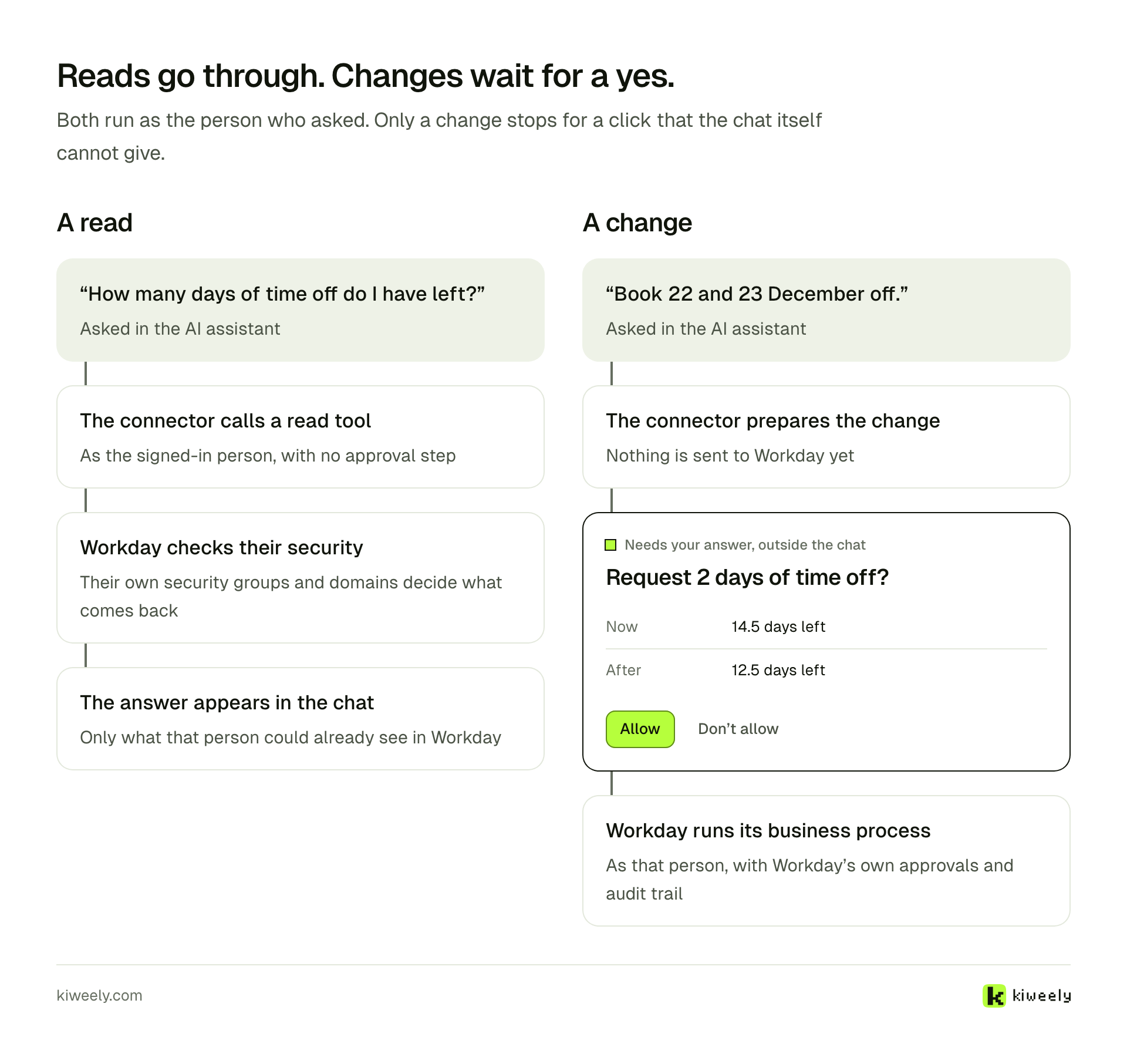
Today the routes differ here. ChatGPT asks for confirmation on write tools by default. Workday says Sana in Claude follows the approval chains already configured in Workday. Vendors differ: StackOne holds writes for sign-off, while others expose write tools such as create worker or terminate worker, so check each tool list before you connect it. Start every rollout read-only and turn changes on one at a time.
Which option fits which situation?
- Employees want self-service in Microsoft 365 Copilot, Teams, Slack or Gemini Enterprise, and you are on UMSA. Start with Workday’s Sana Self-Service Agent. If Copilot is your only assistant, compare Microsoft’s own Workday pack too.
- You build agents on Workday Extend AI. Use Agent-Ready Tools through the Agent Gateway, and budget the Flex Credits per 100 calls.
- Your company uses Claude, and the self-service skill set is enough. Apply for Sana from Workday in Claude, knowing it is in early access.
- Your people use more than one assistant, or need custom reports and WQL, on any tenant. Use a per-user MCP connector: a vendor’s, your own, or Kiweely Bridge when it arrives.
- You are a developer exploring. Use a free Workday developer tenant and read tools only, whichever server you try.
Where does Kiweely Bridge fit?
Kiweely Bridge is coming next. It is built for the fourth case: Workday inside Claude, ChatGPT and Gemini for every employee, on any standard tenant, with no Workday AI agreement. Each person signs in as themselves on Workday’s own sign-in screen, and every call runs under that worker’s own security groups and domains. It reads live Workday data and runs your existing custom reports. It is read-only by default; admins turn changes on one by one, and every change waits for a card in the browser that shows what it is now and what it will be after. Nothing is stored: no Workday records, questions or answers are written to disk, a database or logs. An AI admin agent sets up the API client, chooses which tools and fields exist and tests as real roles.
It is priced per company, by size, with unlimited calls: $499 a month up to 1,000 employees, $1,499 up to 5,000 and $3,999 up to 20,000. You can register interest or read how it compares.
What is still unsettled?
Workday’s own pages disagree on a few points, so check them again before you plan:
- Agent-Ready Tools are “generally available in Workday Extend AI” (release, 13 October 2026), while the admin guide says “for Extend Professionals only” (updated 13 November 2026). Workday’s admin guide release notes for 30 October 2026 say “Changed Extend Professional SKU to Extend AI”, so the two are most likely one subscription under its old and new name.
- Sana in Claude is “early access”, generally available “in late 2026” (Workday), and “Beta” (Claude’s directory).
- The Self-Service Agent in Gemini Enterprise was early access on 28 May 2026 and is called generally available in Workday’s 13 October release.
We will update this page when they change.
Frequently asked questions
Is there an official Workday connector for Claude?
Yes, Sana from Workday, listed in Claude's connector directory as a Beta service made by Workday. It needs an active Workday UMSA and the relevant agents set up in Agent Management Hub, and admins apply for access through a form. Today it covers HR and finance self-service such as pay, time off, policy questions, expenses and approvals.
Is there a Workday app for ChatGPT?
We found none as of 17 November 2026, and Workday's October announcements name Claude, Gemini Enterprise, Microsoft Copilot, Teams and Slack, not ChatGPT. ChatGPT reaches Workday through a custom MCP server: Workday's Agent-Ready Tools, a vendor's server or your own.
Does connecting an AI assistant to Workday need an integration system user?
Not any more for the main routes. Workday's MCP uses an OAuth authorization code sign-in, Microsoft's simplified Employee Self-Service set-up runs every call as the signed-in user, and Workato's End User MCP server signs each user in individually. An integration system user gives every person in the chat the same shared access, which is the thing to avoid.
Which option is cheapest?
It depends on volume and who uses it. Workday's routes are charged in Flex Credits per request or per 100 tool calls, with no public dollar price per credit. Vendors charge by plan, seat or call. Building your own costs engineering time and upkeep after each Workday release.