A few years after ChatGPT arrived, there are two different worlds: the Workday ecosystem, and everything outside it.
Outside Workday, the change has been dramatic, and at times overwhelming. New frontier models now land every few weeks instead of every few months. Software engineers have moved from prompt engineering to loop engineering to graph engineering, and from chat windows to agent systems that run an entire code base, with dozens or even hundreds of AI agents working at once. More and more, those agents are trusted with real decisions and real execution, and they improve without a human sitting in the middle of every loop.
Inside Workday, the picture looks very different. Calculated fields, reports, integrations, Extend apps and whole implementation projects are still built by hand, click by click, much as they were ten years ago.
It isn't for lack of trying. Many pioneers in the ecosystem, Workday included, have worked to bring modern AI into this closed world. But each option falls short:
- Developer tools like Codex and Claude Code are powerful, but their learning curve puts them out of reach for most Workday professionals.
- Generic chatbots hand you long, often outdated instructions that you still have to carry out yourself.
- Workday's own AI agents help with some tasks, but they don't do the work end to end, and you have to learn Flex Credits to use them.
Until now, the Workday ecosystem has not had one AI agent that is truly useful and affordable.
That changes with kiweely.
One agent for all of your Workday work
kiweely does the Workday work itself. Studio integrations and Extend apps. Financials implementation and Prism. Release regression testing and day-to-day security troubleshooting. Presales demos and post-production tenant monitoring. You describe what you need; kiweely works in the tenant, and you approve each change before it is made.
That may sound too good to be true, so we recorded it. Our YouTube channel has uncut demos of kiweely working in real Workday tenants: https://www.youtube.com/@Kiweely. They show only a small part of what the product does.
What kiweely is, and why it is so good at Workday
You have probably seen plenty of Workday "skills", MCP servers and proof-of-concept demos lately. kiweely is a different kind of thing: a complete product rather than a single piece.
kiweely is a desktop app for Mac and Windows, built for Workday consultants, developers and admins and the work they do every day. Around the AI agent sits everything it needs to do Workday work: a toolbox, skills, Workday knowledge and connections to your tenants and Workday's own sites. It runs on the AI account you already have, a ChatGPT or Claude plan or an API key, so there are no Flex Credits to learn or budget for.
So what actually makes it different from every other tool on the market, including Workday's? One simple example shows it.
Example: a calculated field
Say you need a calculated field that returns an employee's oldest dependent's last name.
An experienced Workday consultant can already picture the tiered set of calculated fields that requires. Everyone else has two common options today:
- Ask a chatbot such as ChatGPT or Claude. You get a long list of step-by-step instructions, and you do the clicking.
- Turn on computer use or a browser extension in a desktop AI app. Now the AI can try to click through the steps itself. In practice it is slow: it reads your screen visually and runs Workday tasks it may never have seen. Even when it finishes the field, there is no easy way to check that the field returns the right value for real employees.
Here is how kiweely handles the same request:
You choose what the agent can reach. Every conversation in kiweely has its own connections. For this task you sign in to the target tenant in kiweely's built-in browser. The agent then works with exactly your access, your domain and business process security, and nothing more.
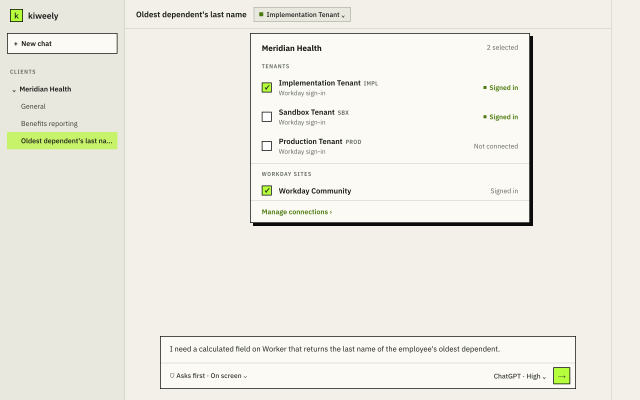
The tenant connection gives the agent real context. It can read the Workday screens just as you would, far more efficiently than a generic AI tool, and where your security allows, it can also query the tenant directly.
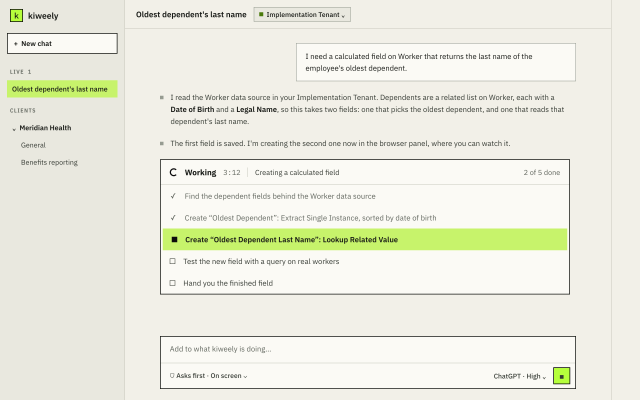
It builds, then tests. Before building anything, kiweely looks up the data source behind the field to find exactly which business objects and fields to use. It then creates the calculated fields in its own browser, and you can watch it happen live. Finally it runs a query against the new field to confirm it returns the expected values for real employees.
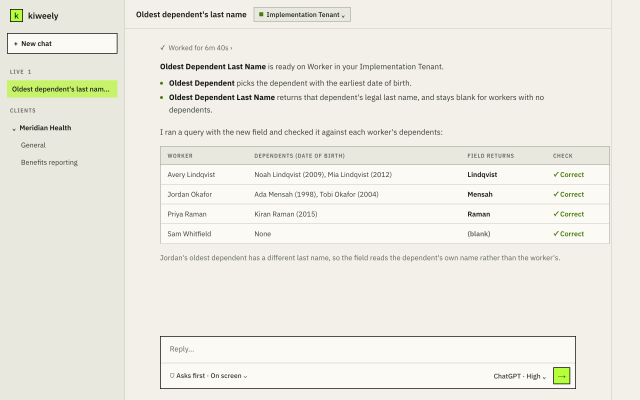
You get a verified result. At the end you have the exact calculated field you asked for, built and tested. You never had to work in the tenant yourself. Your job was to explain what you needed and approve the changes.
Watch kiweely build a complex calculated field from start to finish: https://youtu.be/aHnNpdrkTdA
The same loop, for every kind of Workday work
The calculated field is a small example of something kiweely does every time: it delivers results it has checked itself. The same applies to larger work, such as Extend apps, Studio integrations, custom reports and implementing a new Workday module.
What sets kiweely apart is that it gives the AI agent a complete way to see and do Workday work. That lets the agent close the whole loop on its own: design, build, test and deploy. The tenant connection is only one of many features that make this possible.
Try it free
kiweely is a young product, and it is already solving real Workday problems. Kiweely Personal is free for one person: every feature, no card, no trial. If you don't have a Workday personal developer tenant yet, you can get one free from Workday's Developer Program: https://developer.workday.com
Download kiweely at https://kiweely.com.