


To prove that regular employees, frontline managers, and HR Partners cannot read unauthorized peer compensation, disciplinary records, or out-of-scope organizations in Workday, run a four-step negative boundary test in Sandbox: inspect policies with View Security for Securable Item, trace cumulative user grants with Security Analysis for Workday Account, validate UI screens via Start Proxy, and execute live REST / WQL / RaaS readbacks under dedicated test accounts.
Most security leaks in Workday happen because teams only run positive tests—confirming a manager can see their own team—without running negative boundary checks against peer workers, indirect reports, and sensitive columns. Because Workday computes a user’s effective access as the union of every security group they belong to, one forgotten unconstrained group assignment silently widens both browser reports and external API responses.
Step 1: Select Four Concrete Target Workers in Sandbox
Negative boundary testing requires fixed relationships between the actor (the persona signing in) and the target (the worker record being queried). Before running any report or query in Sandbox, pick four synthetic or non-production worker records and record their 32-character Workday IDs (WID) and Employee ID values:
- Persona A — Regular Individual Contributor (
Employee As Selfonly): A non-manager employee inSupervisory OrganizationWarehouse 4 with zero administrative or support roles. - Persona B — Peer Worker (Same Org): Another individual contributor inside Warehouse 4 reporting to the same manager as Persona A.
- Persona C — Direct Manager (
ManagerConstrained): The supervisory manager assigned to theManagerrole on Warehouse 4, where Warehouse 4 also has a child supervisory organization (Warehouse 4 - Night Shift) managed by a subordinate supervisor. - Persona D — Scoped
HR Partner(Role-Based ConstrainedorIntersection): An HR Partner assigned to support Warehouse 4, plus a fifth control worker in an unrelated supervisory organization (Corporate Finance) outside Persona D’s assigned scope.
Verify each test actor’s exact group memberships first by running View Security Groups for User in Sandbox. Confirm that neither Persona A nor Persona C holds stray unconstrained groups such as HR Administrator, Payroll Administrator, or Implementers.
Step 2: Audit Securing Domains with Delivered Workday Reports
Before proxying or calling APIs, map which domains secure the sensitive fields and data sources in your test scope:
- Enter
View Security for Securable Item(or search shortcutsecura) in the Workday search bar. - Check each high-risk item you plan to test—for example,
Total Base Pay - Amount,National Identifiers,Disciplinary Actions in Progress,Payment Elections Current, and theAll Workersdata source. - Click View Security on each match to list the securing domain security policy (such as
Worker Data: Compensation,Person Data: ID Information,Worker Data: Payroll (Payment Elections), orWorker Data: Public Worker Reports) and inspect both Report/Task Permissions (View/Modify) and Integration Permissions (Get/Put). - Run Security Analysis for Securable Item and Account for Persona A, Persona C, and Persona D against
Total Base Pay - AmountandNational Identifiers. This report pinpoints the exact security group and policy path if an actor holds unexpected access. - Run Security Analysis for Workday Account (or Compare Security of Two Worker Accounts between Persona A and Persona B) to audit cumulative tenant permissions across functional areas.
Activate Pending Changes Before Testing
Whenever you tighten a domain or business process security policy during remediation, run Domain Security Policies with Pending Changes and execute Activate Pending Security Policy Changes. Policy edits do not apply to UI or API calls until activated.
Step 3: Execute the Persona Role-Boundary Matrix
Every row in the matrix below defines an explicit actor, target record, data element, and expected Sandbox result. A Pass on a negative boundary means Workday omits the column, returns zero rows for the out-of-scope worker, or rejects the request with a permission error.
| Persona (Actor) | Target Worker Tested | Data / Action Requested | Expected Workday Result | Common Misconfiguration If Leaked |
|---|---|---|---|---|
| Persona (Actor)Employee (Persona A) | Target Worker TestedSelf (Persona A) | Data / Action RequestedOwn time-off balance & payslips (Self-Service: Time Off Balances, Self-Service: Payroll (My Payslips)) |
Expected Workday ResultAllowed: Returns Persona A’s own balances and payslips | Common Misconfiguration If LeakedMissing Employee As Self on self-service domain |
| Persona (Actor)Employee (Persona A) | Target Worker TestedPeer in same org (Persona B) | Data / Action RequestedPublic directory info (businessTitle, supervisoryOrganization) |
Expected Workday ResultAllowed: Returns public directory fields only | Common Misconfiguration If LeakedNormal if All Employees is on Worker Data: Public Worker Reports |
| Persona (Actor)Employee (Persona A) | Target Worker TestedPeer in same org (Persona B) | Data / Action RequestedTotal Base Pay - Amount, National Identifiers, Time Off Balances |
Expected Workday ResultBlocked: Empty/omitted fields or 403/400 error | Common Misconfiguration If LeakedUnconstrained group (All Employees) accidentally added to Worker Data: Compensation |
| Persona (Actor)Manager (Persona C) | Target Worker TestedDirect report (Persona A) | Data / Action RequestedTeam time-off balances & job profile (Worker Data: Time Off (Time Off Balances Manager View)) |
Expected Workday ResultAllowed: Returns direct report’s permitted team fields | Common Misconfiguration If LeakedMissing Manager group on manager view domain |
| Persona (Actor)Manager (Persona C) | Target Worker TestedDirect report (Persona A) | Data / Action RequestedFull National Identifiers (Person Data: ID Information) or bank account numbers |
Expected Workday ResultBlocked: Omitted or masked per self-service constraint | Common Misconfiguration If LeakedManager granted View/Get on Person Data: ID Information |
| Persona (Actor)Manager (Persona C) | Target Worker TestedIndirect report in staffed child org | Data / Action RequestedCompensation or review notes when policy requires direct reports only | Expected Workday ResultBlocked if group uses COO or COUS; Allowed only if COAS (Management Chain) is intended |
Common Misconfiguration If LeakedManagement Chain (COAS) used on policy instead of Manager (COO/COUS) |
| Persona (Actor)Manager (Persona C) | Target Worker TestedUnrelated org (Corporate Finance) | Data / Action RequestedAny non-public worker compensation or absence field | Expected Workday ResultBlocked: Zero rows returned for out-of-org target | Common Misconfiguration If LeakedManager (Unconstrained) added to domain policy instead of constrained Manager |
| Persona (Actor)HR Partner (Persona D) | Target Worker TestedWorker in assigned Warehouse 4 | Data / Action RequestedStaffing, compensation, and disciplinary status within Warehouse 4 | Expected Workday ResultAllowed: Returns permitted HR fields for assigned org | Common Misconfiguration If LeakedExpected constrained HR Partner access |
| Persona (Actor)HR Partner (Persona D) | Target Worker TestedWorker in Corporate Finance (unassigned org) | Data / Action RequestedCompensation, disciplinary notes, or home contact details | Expected Workday ResultBlocked: Zero rows or omitted non-public fields | Common Misconfiguration If LeakedHR Partner assigned to an unconstrained group or top-level org role |
Step 4: Verify Both Browser UI (Start Proxy) and Live API Readback
Testing only in the Workday browser UI misses integration-specific Get permissions and custom report sharing behavior. Run both halves of the check:
Browser Verification via Start Proxy
- In Sandbox, run Start Proxy and enter Persona A.
- Search for Persona B, open Persona B’s worker profile, and confirm Compensation, Pay, Personal -> IDs, and Performance / Disciplinary Actions tabs are hidden.
- Run any shared custom reports (see troubleshooting shared custom report empty rows and columns) to verify Persona A sees zero unauthorized columns.
- Repeat Start Proxy for Persona C (checking both a direct report in Warehouse 4 and an indirect report in Warehouse 4 - Night Shift) and Persona D (checking Corporate Finance), then run Stop Proxy.
Live WQL and REST API Readback
Workday disables external integrations and OAuth service connections during a Start Proxy session. To verify what external applications or AI assistants receive over the wire, sign in to Sandbox via an OAuth API Client (Register API Client with Authorization Code Grant and PKCE) using a non-production test user for each persona and run the exact same WQL query against /wql/v1/data:
SELECT worker, employeeID, supervisoryOrganization, totalBasePay_Amount, nationalIdentifiers, disciplinaryActionsInProgress
FROM allWorkers
WHERE employeeID IN ('21097', '21402', '29811')
Inspect the HTTP status and JSON response for each persona’s Bearer credential:
- When Persona A (Employee) runs this query including restricted fields (
nationalIdentifiers,disciplinaryActionsInProgress), Workday’s WQL engine rejects inaccessible fields (HTTP 400“Specify a valid report field”) or, when querying only fields where Persona A hasEmployee As Selfconstrained access, populatestotalBasePay_Amountsolely on Persona A’s own row while leaving peer rows blank. - Repeat against REST endpoints such as
GET /common/v1/workers/{Persona_B_WID}/paySlipsandGET /absenceManagement/v5/balances?worker={Persona_B_WID}under Persona A’s session to confirm Workday denies cross-worker reads.
GET /ccx/api/wql/v1/{tenant}/data?query=SELECT+worker,totalBasePay_Amount+FROM+allWorkers HTTP/1.1
Accept: application/json
Automating Multi-Persona Boundary Checks
Running multi-persona proxy tests and pre-AI security group audits by hand takes hours whenever domain policies change. Teams connecting external assistants through Kiweely Bridge (coming next) get an AI admin agent that automates role-boundary testing across Employee, Manager, and HR Partner personas in Sandbox and adds in-memory field redaction before publishing access to Production. Consultants and HRIS engineers configuring tenant security today can also run persona verification workflows directly in Kiweely Vine.
Watch Kiweely Vine build, secure and test an Extend app
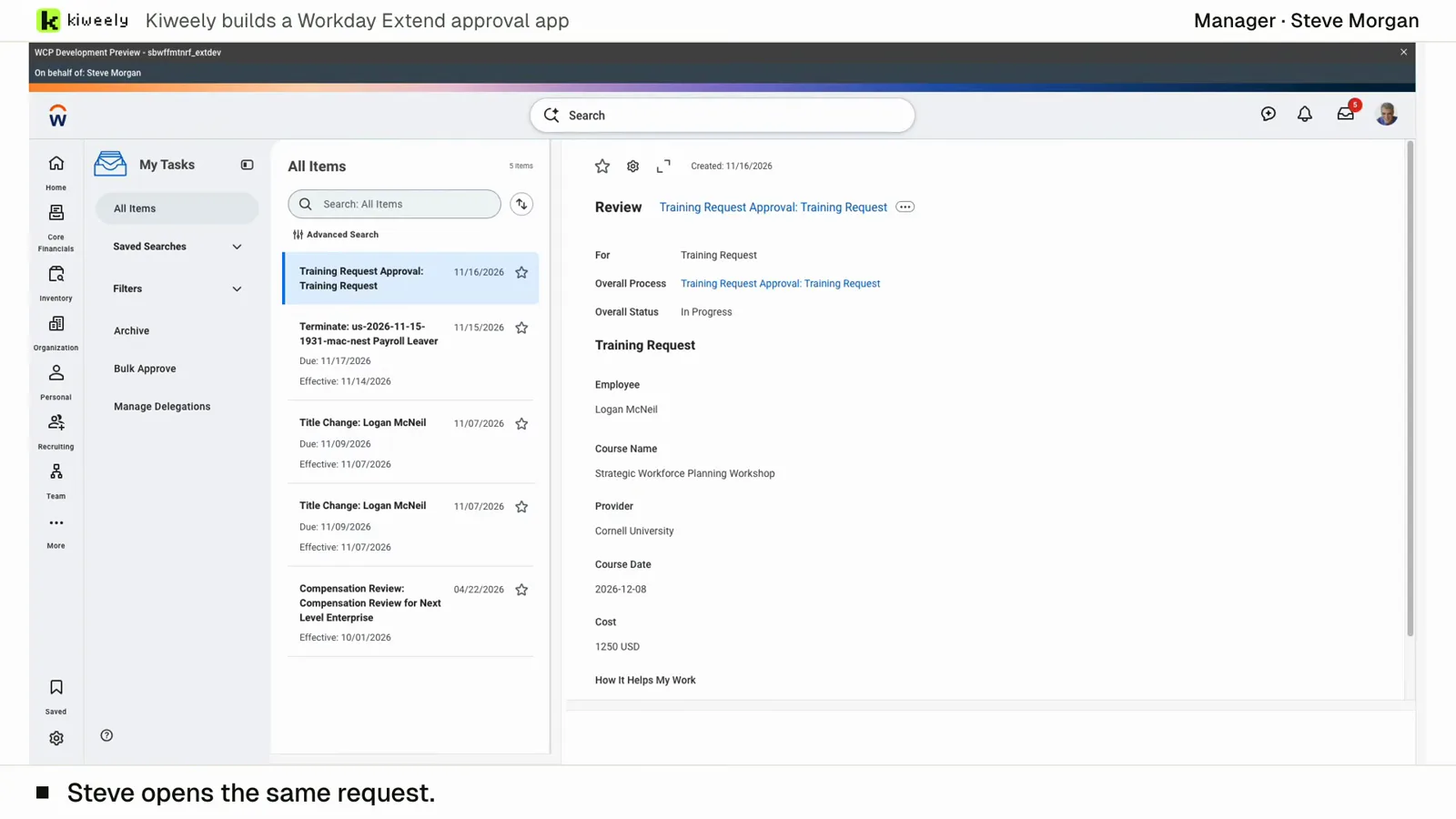
From two short messages, Kiweely Vine builds a training approval app in a Workday Development tenant. It sets up the app’s access (Employee As Self and Manager) and the approval’s business process security policy, activates the pending security changes, adds the Manager step to the routing, then tests it as the employees and managers through Start Proxy, privacy checks included. 1 h 51 min from sign-up to the checked result.
Watch the film (15 min) · Start for free
Frequently asked questions
Why isn't Start Proxy alone enough to test Workday API and external integration boundaries?
Workday proxy sessions run inside the interactive browser UI and explicitly block external service connections and integrations. To prove what an OAuth API client returns over REST, WQL, or RaaS, execute live API calls using non-production test accounts assigned to each target persona.
Which Workday report shows the exact security group granting a worker unexpected access to a field?
Run Security Analysis for Securable Item and Account, enter the report field, task, or data source plus the worker's Workday account, and inspect every security policy and security group granting access.
Why can a constrained Manager suddenly see compensation across the entire company?
Workday evaluates a user's effective permissions as the union of all their security groups. If that manager was also manually added to an unconstrained User-Based group (such as Report Writer or Compensation Administrator), the unconstrained group overrides the Manager constraint.
Do edits to domain security policies take effect immediately during Sandbox testing?
No. Adding or removing security groups on a domain or business process security policy stays pending until an authorized administrator runs Activate Pending Security Policy Changes. Edits to security group membership or definitions take effect immediately.