


A custom report becomes a Report as a Service (RaaS) when you enable an advanced or search report as a web service. Workday then exposes results through URLs. The RaaS concept topic lists three consumers: custom Workday Extend applications, integrations to external services such as payroll or benefits providers, and external tools such as Microsoft Excel. Output types on that topic are CSV, GData, JSON, RSS, Simple XML, and Workday XML.
An AI assistant can help you find reports and draft columns. It cannot safely “turn on RaaS” as a side effect. Enabling the web service creates a URL that any tenant account with permission to the report and its data can call. Simple reports do not support the advanced options where web services are configured.
Security for the advanced-options topic is Custom Report Creation and Manage: All Custom Reports in the System functional area. Do this work in a non-production tenant, then move the report with your usual migration. Deployment Agent, if you use it to discover reports, is itself limited to Implementation, Preview, Sandbox, and Customer Central connected to non-production.
What to ask before anyone enables the web service
Workday’s sample prompts include a tenant-inspection line for this job:
In my [tenant name] tenant, show me all custom reports created by [User/Security Group].
In a tenant that is not Customer Central, the same topic’s shorter form is “in my tenant.” Use it to get a list. Then open each report. Do not enable every report the list returns.
| Question | Where you answer it |
|---|---|
| QuestionIs this a standard report the integration depends on? | Where you answer itCopy it to a custom report first. If Workday updates the standard report, an integration pointed at the standard report breaks. Enable the custom copy. |
| QuestionAdvanced or search, or something else? | Where you answer itWeb Services Options exist for advanced and search reports. Simple reports have no advanced options. |
| QuestionWho will call the URL? | Where you answer itA valid tenant account, plus permission to view the report and the data. Enabling the web service does not bypass security. |
| QuestionDoes the report owner’s username contain a backslash? | Where you answer itGET requests for a custom report enabled as a web service fail when the owner’s username contains \. |
| QuestionWill an outbound EIB use it? | Where you answer itEnable As Web Service is what Workday names for outbound EIB use and for external sites. |
Enable As Web Service, namespace, and what not to change later
On Edit Custom Report, open the Advanced tab, Web Services Options:
| Option | What Workday says |
|---|---|
| OptionEnable As Web Service | What Workday saysUse the report in an outbound EIB, or let an external site access it. Access still requires a tenant account and permission to the report and the data. |
| OptionNamespace | What Workday saysWorkday generates one. You may change it. Each web-service report should have a unique namespace, but Workday does not enforce uniqueness. If you change the namespace and do not update callers, the request fails. |
The generated namespace format on the RaaS concept topic is:
urn:com.workday.report/ plus the report name.
The namespace does not change when you rename the report or change the owner. That is deliberate, so existing integrations keep working. Treat a namespace edit as an integration change, not a cleanup.
Pick the output from the caller’s need
| Output | Use when | Trap |
|---|---|---|
| OutputCSV | Use whenA spreadsheet, no XML. | TrapGroup column headings are dropped. Column order might not match the report definition. For UTF-8, append &bom=true so Excel reads the encoding. |
| OutputJSON | Use whenA system that requires JSON. | TrapStill a secured URL, not an open feed. |
| OutputSimple XML | Use whenDesktop tools that want simpler elements. | TrapSingle- and multi-instance fields become strings. Multi-instance values on the primary business object are separated with semicolons. Dates without times lose the time and the GMT offset. You get a Simple XML URL and an XSD URL. |
| OutputWorkday XML | Use whenREST or SOAP-style integrations that want the literal XML. | TrapOften too heavy for a quick Excel refresh. You get Workday XML, XSD, and WSDL URLs. The concept topic says Simple XML is the better fit for that Excel case. |
| OutputRSS | Use whenPeople subscribe to updates. | TrapThe concept topic says users can monitor updates through an RSS feed without logging in to Workday. Confirm that is acceptable before you enable it. |
| OutputGData | Use whenGoogle gadget integrations. | TrapNarrow. Do not pick it as a default. |
Optimized for Performance limits prompts to indexed fields on indexed data sources. Clear it when you must show non-indexed fields. Background Only forces a background run and still requires security plus a valid URL. Exclude Execution Link from Search hides the report from global search so only unconstrained groups such as Administrators or Implementers, or other people with permission, can run it. Use that when the report exists only as a worklet, a composite subreport, or a Worksheets data view.
Temporary reports are scheduled for deletion in 7 days or on a date you set. They are not deleted until someone runs Delete My Temporary Report Definitions (or an admin runs Delete All Temporary Report Definitions). Do not point an integration at a temporary report.
Calculated fields on the report
If the AI draft says “add a calculated field,” apply the calculated-field rules before you enable RaaS:
- Report-specific fields cannot be used on simple reports.
- You cannot filter discovery boards or Report Writer on fields that return derived instances, such as lookup date rollup.
- Tenant-wide fields are the ones you can reuse on an EIB or another report. Convert only when Maintain Calculated Fields or Maintain Calculated Fields for Report shows Convert.
- Run Calculated Field Exception Audit before the integration test. An exception that is only a warning in the report UI still changes the file your vendor receives.
Business Object Details shows which fields the object actually has. A column the model invented will not appear in the prompt.
A consultant’s review before the URL is shared
- Copy standard reports. Enable the copy.
- Confirm advanced or search, owner username has no
\, and the report is not temporary. - Set Enable As Web Service. Record the namespace. Do not “tidy” it after the first successful call.
- Choose one output and save the matching URL (CSV, JSON, Simple XML, or Workday XML / XSD / WSDL).
- Run the report as a user who should see the data and as a user who should not. The URL uses that account’s security.
- If an outbound EIB will call it, test the EIB in the same non-production tenant. Namespace or column-order drift shows up as a failed transform, not as a report error.
- If you used Deployment Agent to list reports, rate the answer. The list is a starting inventory. The report definition is the source of truth.
Facet options, Prism, and Worksheets are separate advanced options. They do not replace the web service flag. Search-report facet XML aliases exist only after Enable As Web Service is selected.
Failure modes
| What breaks | Published cause |
|---|---|
| What breaksGET fails immediately | Published causeReport owner username contains a backslash. |
| What breaksCallers fail after a “harmless” edit | Published causeNamespace changed and the integration still sends the old one. Two reports can also share a namespace because uniqueness is not enforced. |
| What breaksExcel shows the wrong characters | Published causeCSV is UTF-8 and the URL is missing &bom=true. |
| What breaksExcel columns look regrouped or reordered | Published causeCSV drops group headings and may reorder columns. |
| What breaksDates look different in Simple XML | Published causeDate-only fields lose time and GMT offset. |
| What breaksThe report vanished from search | Published causeExclude Execution Link from Search is on. People still need the URL and permission. |
| What breaksIntegration hits a deleted definition | Published causeThe report was temporary and someone ran the delete task. |
| What breaksStandard report mapping breaks after a Workday update | Published causeYou enabled the delivered report instead of a custom copy. |
Watch Kiweely Vine turn a report into a web service and an Outbound EIB
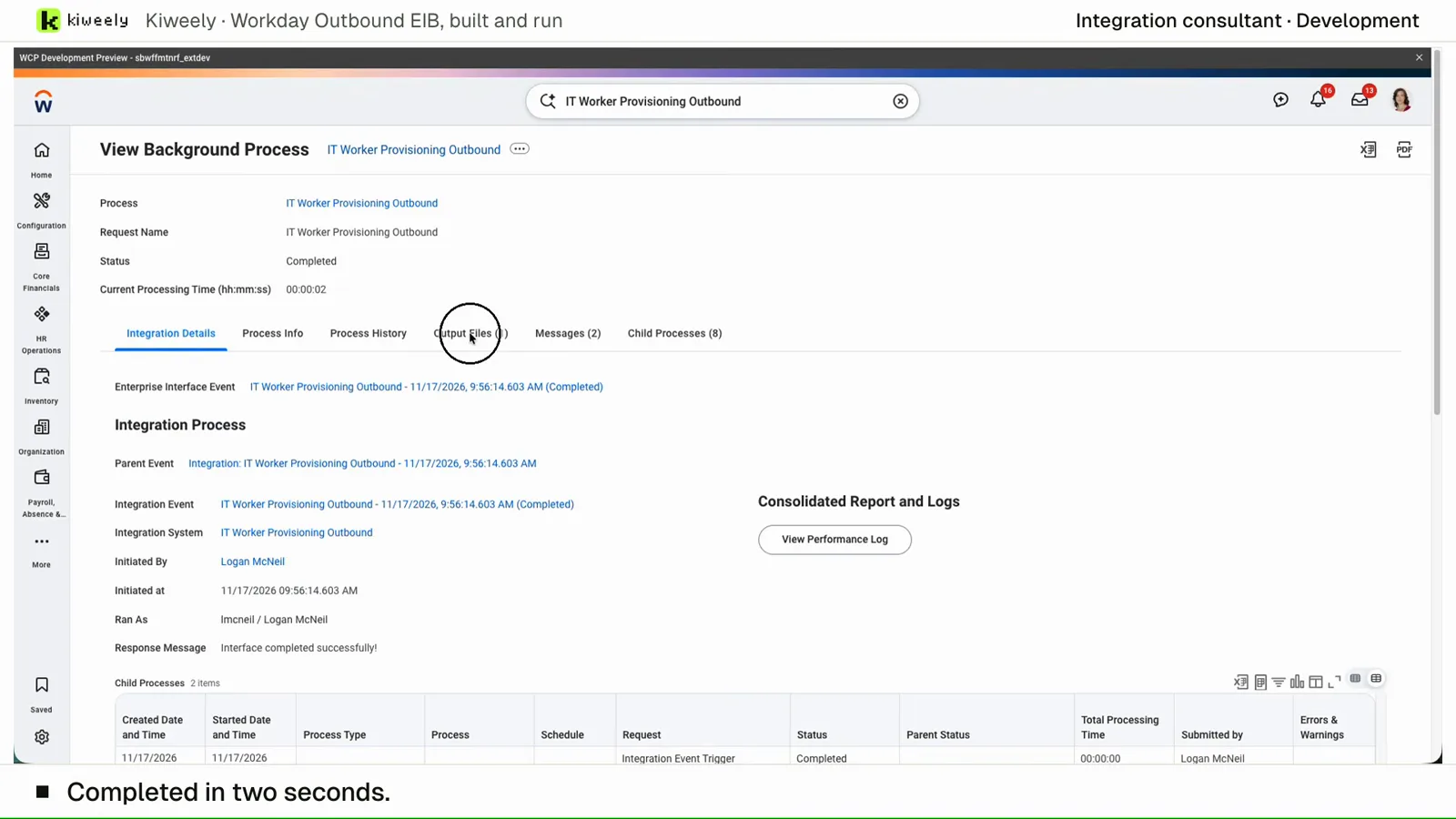
From a plain request, Kiweely Vine builds a custom report on active workers, enables it as a web service with an organization prompt, makes it the source of an Outbound EIB, launches it in a Workday Development tenant and checks the output file against the tenant’s workers. 21 minutes from the request to the checked output.
Watch the film (2 min) · Start for free
Frequently asked questions
Can Deployment Agent create the RaaS endpoint?
The published sample asks it to show custom reports in a tenant. Creation and Enable As Web Service are still Edit Custom Report on the Advanced tab. The agent does not replace that task.
Is RaaS the same as a public API?
No. Workday limits the external link to users with a valid tenant account and permission to view the report and the data. RSS is the output type the concept topic describes as usable without a Workday login. Treat RSS as a separate decision.
Which output should a benefits file use?
The concept topic names payroll and benefits providers as integration examples and points REST or SOAP integrations at Workday XML, with Simple XML as the lighter alternative. Match the file your provider already parses. Changing output type changes the URL and the schema.
Do I need Workday Extend to use RaaS?
Extend applications are one consumer. Integrations and Excel are the others. You can enable a report as a web service without building an Extend app.
Sources checked
Frontmatter pages, fetched 2026-11-16. The report-discovery sentence is Workday’s published sample.