


Why does a Workday EIB load fail? Usually because of the data, not the EIB. When Workday rejects rows, it’s most often a reference ID that doesn’t match any record in this tenant, a value in the wrong format, a row that shouldn’t be there at all, or a launching account without the security for the operation. Almost all of that can be found before the launch. Here is how we did it on a real load.
The job
A hotel group (sample data in a Workday Development tenant) needed its new cost centers in Workday. The source was the kind of spreadsheet consultants actually get: mixed date formats, inconsistent codes, a repeated line, closed rows, rows marked “do not load”, subtotals and blanks.
We asked Kiweely Vine, in plain English, to load it.
1. Read the spreadsheet as Workday will
Before building anything, Kiweely listed what was wrong with the source: the mixed dates, the inconsistent codes, the repeated line, the closed and “do not load” rows, the subtotal lines and the blanks. It checked the tenant too: Development had no existing cost center with any of the proposed codes or names, so the load wouldn’t collide with records already there.
Then it asked only the questions a person has to answer: which of the repeated lines to keep, and whether closed rows load. It did not guess.
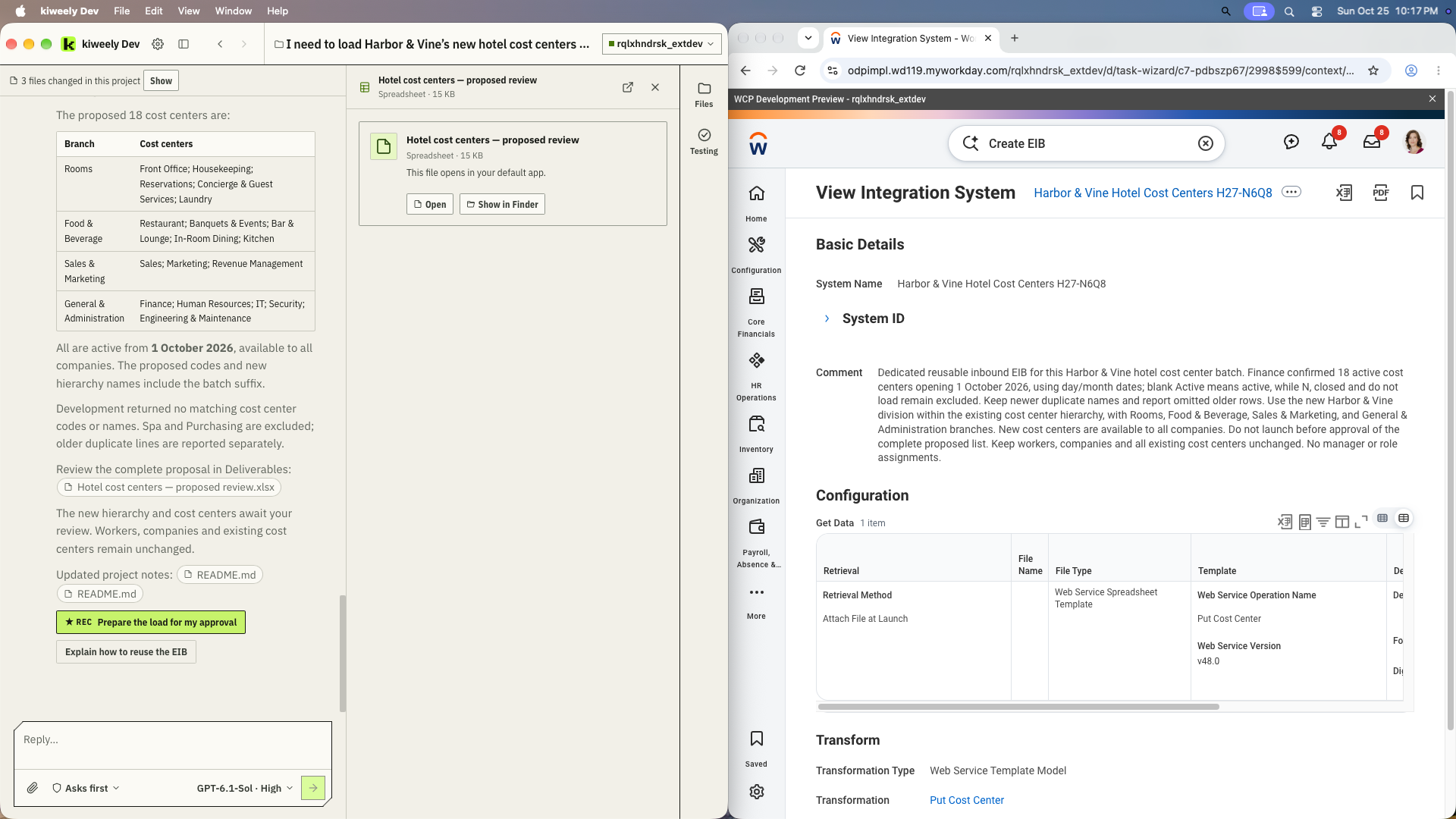
The result was a proposed list of 18 cost centers, grouped under four branches, all active from 1 October 2026, with Spa and Purchasing excluded and the older duplicate lines reported separately. The consultant reviewed it before anything touched Workday. One correction came out of that review: the first proposal added a batch suffix to the Finance codes, and that was fixed before loading.
2. Build a reusable EIB on Workday’s own template
Kiweely created an inbound EIB with Create EIB. On the Get Data tab, the Retrieval Method is Attach File at Launch, and the web service operation is Put Cost Center (v48.0). The spreadsheet that goes in is Workday’s generated template for that operation, filled with the approved rows, so the columns are exactly what the operation expects.
Because the file is attached at launch, the same EIB is there for the next batch.
3. Check security before the launch, not after
This is where our run needed a person. The worker launching the load didn’t yet have the security to create cost centers or run the EIB. Workday’s own EIB examples list the domains involved, such as Integration Build and Integrations: EIBs in the Integration functional area, alongside the domain for the data being loaded. Kiweely proposed the security changes, they were approved, and only then did it launch.
4. Launch, then read Workday’s result, not just the status
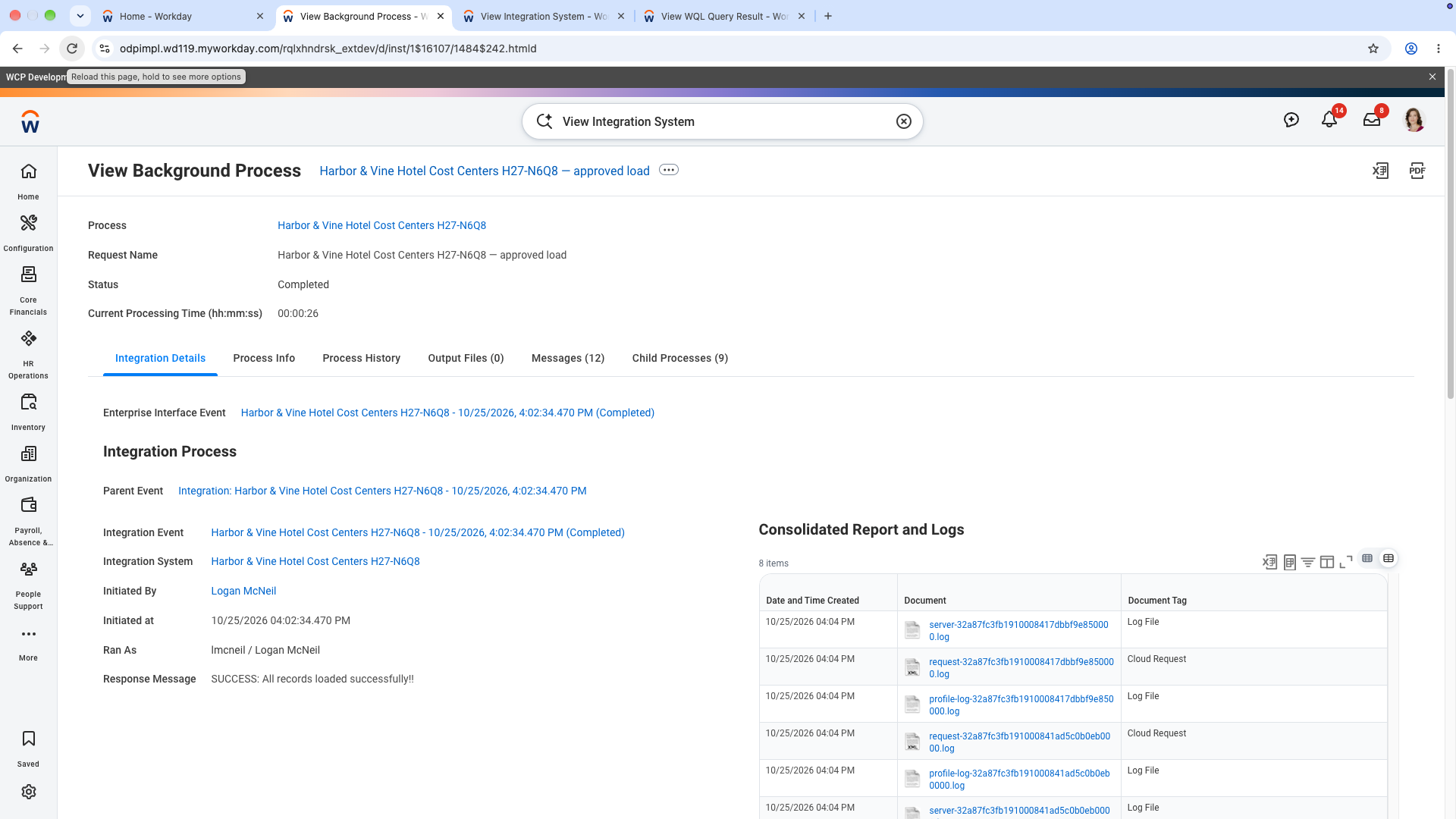
The run’s View Background Process page showed Completed, with 18 processed, 18 successful, 0 failed and “All records loaded successfully”. That status alone isn’t the end of it: a run can also finish as Completed With Errors, where some rows load and others are rejected, so the counts matter as much as the word “Completed”.
Kiweely then read all 18 cost centers back from Workday: codes, names, the 1 October 2026 date, group membership and the division path. It also searched for the excluded rows and found none, and each repeated code returned exactly one record.
When a row does fail
The message usually names the problem. The most common shape is Invalid ID value. '<value>' is not a valid ID value for type = '<ID type>': the value in that column doesn’t match a Reference ID of the type the column expects in this tenant. The fix is the source value, not the EIB. Our guide on reading EIB errors goes through where to find them and what each means: Workday EIB load errors.
What Kiweely did, and what a person did
Kiweely read and cleaned the source, checked the tenant, built the EIB, proposed the security it needed, launched the load and verified every record. A person answered the business questions, approved the cleaned list and approved the security changes. The whole session, first-use setup and checks included, took 97 minutes.
The full recorded run is on our YouTube channel: watch the film. The write-up is at kiweely.com/blog/messy-spreadsheet-eib.