


Yes. Kiweely Vine is a desktop AI agent for Workday consultants and developers (Mac and Windows) that makes real configuration, business process, and security policy changes directly inside the Workday tenant you connect—and tests them as the affected workers through Start Proxy. By contrast, chat assistants (ChatGPT, Claude, Gemini) never touch your tenant, and Workday’s own generally available Deployment Agent (Ask skill) is documented as read-only tenant inspection in non-Production environments.
- Download Kiweely Vine free ($0 on a Workday personal developer tenant, with $5 of Kiweely Credits included; Personal and Team seats for client and company tenants).
- Leading an in-house HRIS or Workday admin team? Kiweely Nest (coming next) gives your company a team of eleven AI specialists led by Kai the Solution Architect, starting with a 30-day paid pilot—book a demo.
Side-by-Side: Every AI Option for Workday Configuration, Business Processes, and Security
When consultants or HRIS leads ask whether AI can configure Workday, five categories come up. Only one executes general tenant configuration end to end today:
| Capability | Kiweely Vine (Consultant’s Desktop Agent) | Workday Deployment Agent (Ask Skill) |
Workday Developer Agent & Custom Agents | ChatGPT, Claude & Gemini (Chat Apps) |
|---|---|---|---|---|
| CapabilityReads live tenant BPs, rules & security | Kiweely Vine (Consultant’s Desktop Agent)Yes, in any connected tenant | Workday Deployment Agent ( Ask Skill)Read-only in Implementation, Sandbox, Preview & Customer Central (not Production) | Workday Developer Agent & Custom AgentsOnly pre-registered API tools / App Builder artifacts | ChatGPT, Claude & Gemini (Chat Apps)No tenant connection |
| CapabilityEdits business process steps & condition rules | Kiweely Vine (Consultant’s Desktop Agent)Yes — edits definitions, delays, routing, and rules | Workday Deployment Agent ( Ask Skill)No (Configuration Cloud writes are opt-in partner early access only) | Workday Developer Agent & Custom AgentsNo — builds Extend app and agent artifacts in App Builder; Workday documents it does not configure tenant security | ChatGPT, Claude & Gemini (Chat Apps)No — outputs step-by-step checklists |
| CapabilityEdits domain & BP security policies + activates | Kiweely Vine (Consultant’s Desktop Agent)Yes — edits permissions, checks pending queues, runs Activate Pending Security Policy Changes | Workday Deployment Agent ( Ask Skill)No — advises which policy to inspect | Workday Developer Agent & Custom AgentsNo | ChatGPT, Claude & Gemini (Chat Apps)No |
| CapabilityTests changes across roles via Start Proxy | Kiweely Vine (Consultant’s Desktop Agent)Yes — switches personas via Start Proxy and verifies access | Workday Deployment Agent ( Ask Skill)No | Workday Developer Agent & Custom AgentsNo — Workday documents that custom agents cannot use a proxy | ChatGPT, Claude & Gemini (Chat Apps)No |
| CapabilityBuilds EIBs, custom reports, calc fields & Studio | Kiweely Vine (Consultant’s Desktop Agent)Yes — end to end in the tenant and local Workday Studio | Workday Deployment Agent ( Ask Skill)Read-only inspection only | Workday Developer Agent & Custom AgentsExtend & Orchestrate scope only | ChatGPT, Claude & Gemini (Chat Apps)Suggests formulas or XML snippets by chat |
| CapabilityPricing model | Kiweely Vine (Consultant’s Desktop Agent)Vine Free $0 (personal dev tenant); Vine Personal $99/mo; Vine Team $149/seat/mo (2+ seats) | Workday Deployment Agent ( Ask Skill)Requires ASOR + Flex Credits (5 Flex Credits per Ask interaction in Implementation and Sandbox) |
Workday Developer Agent & Custom AgentsSold only through Extend AI + Flex Credits (2 Flex Credits/invocation after 50,000 free/yr) | ChatGPT, Claude & Gemini (Chat Apps)Seat subscription; every tenant click stays left to apply |
Why Workday’s Own AI Agents Do Not Do General Tenant Configuration
Workday ships several AI products under similar names, and knowing the documented boundary of each saves hours of setup:
- Deployment Agent (Q&A) vs. ASOR Deployment Agent (
Askskill):- Deployment Agent (Q&A) on Customer Central answers from documentation and Community posts with zero visibility into your tenant.
- The Agent System of Record (ASOR) Deployment Agent with the Ask skill (Tenant Inspection + Implementation Knowledge) inspects calculated fields, business process definitions, condition rules, and security policies in Implementation, Sandbox, Preview, and Customer Central tenants. Workday documents that it cannot run as an interactive assistant in Production, meters 5 Flex Credits per
Askinteraction in Implementation and Sandbox tenants, and does not write configuration outside opt-in partner early access for Workday Configuration Cloud.
- Workday Developer Agent and Custom Agents:
- Developer Agent lives inside App Builder on the Workday Developer Site to generate Workday Extend model components, pages, and
.agent/.agentskillsdefinitions, and Workday explicitly documents that it does not configure security in your tenant after deployment. - Custom Agents run in delegate mode for end users and can only invoke pre-built Agent-Ready Tools or Custom Agent Actions (orchestrations you already built and secured). Workday explicitly states that the custom agent runtime cannot make arbitrary API calls, cannot edit tenant configuration screens, and cannot be used through a proxy.
- Developer Agent lives inside App Builder on the Workday Developer Site to generate Workday Extend model components, pages, and
- Consumer and Enterprise Chat Assistants (ChatGPT, Claude, Gemini):
- Without a live tenant session, a chat model cannot see whether your child domain inherits parent permissions, which Hire definition shares a Business Process Security Policy, or whether another admin left unrelated changes sitting in Domain Security Policies with Pending Changes. In Kiweely’s recorded five-AI tenant test on the same Workday Development tenant, chat models left 277 steps to apply in Workday on the only passing chat-built custom report (up to 295 including partial runs) and 229 to 340 steps to apply across 7 to 13 calculated fields on the calculated-field task—while Workday’s own Agent Chat replied that it could not create the custom report on your behalf and output instructions instead.
What Your Own AI Agent Does in the Tenant—and What You Still Decide
Kiweely Vine is built on the consultant’s side: it runs on your Mac or Windows computer, signs in to the tenant you connect, and handles the repetitive build, staging, verification, and documentation while leaving business and policy calls with you.
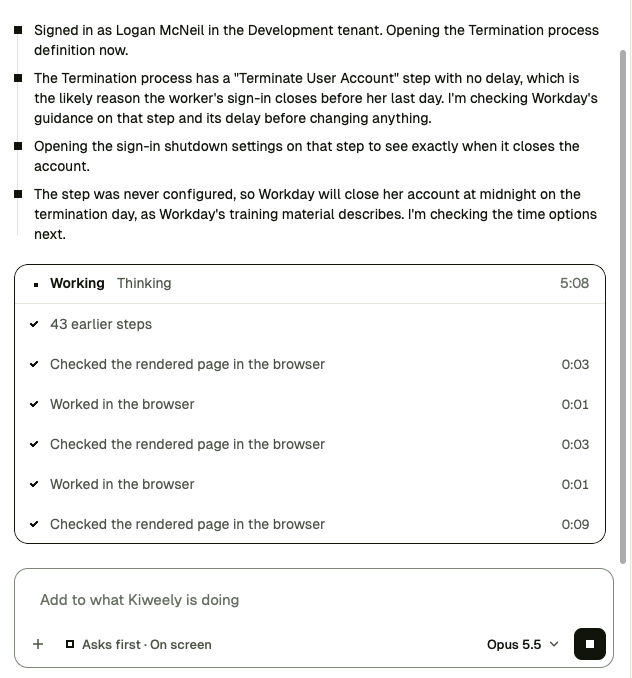
Here are three recorded configuration, business process, and security runs from Kiweely’s own Workday Development tenant on fictional sample data (these are recorded test sessions, setup and verification included—not customer engagements or a guarantee of elapsed time on your project):
1. Business Process Configuration: Fixing a Last-Day Termination Lockout (37 Minutes)
- The problem: Keying a worker’s termination two weeks ahead locked her out on her final working day instead of after she finished work.
- What Kiweely Vine did: Opened the Termination business process definition, traced the early sign-in cutoff to an unconfigured Terminate User Account step (which defaults to closing the account at midnight at the start of the termination date), added a 1-day delay from the effective date so downstream steps were not blocked, ran a test termination keyed two weeks out, verified the account stayed active through the last day, and rescinded the test event—passing 4 of 4 requested checks in 37 minutes (same-day termination and live next-day closure were not run, since the future-dated test event was rescinded).
- What the person decided: Vine first proposed setting the cutoff to 11:45 PM on the termination date; HR wanted access closed the following day instead, so the consultant chose the 1-day delay.
2. Domain & Business Process Security + Start Proxy Testing (1 Hour 51 Minutes)
- The problem: A new Training Approval workflow needed employee self-service submission, manager approval routing, and role-tested security.
- What Kiweely Vine did: Built the Extend app, configured access for Employee As Self and Manager, edited the Business Process Security Policy (Workday will not let a routing step target Manager until the policy permits it), ran Activate Pending Security Policy Changes, added the Manager approval step to routing, and tested submission and approval as real employees and managers through Start Proxy—completing from sign-up to five passed checks in 1 hour 51 minutes (watch the recorded run).
- Where the consultant stepped in: Vine first reported Start Proxy unavailable; the consultant opened Workday’s Start Proxy task to point it to the right screen (and administrator reversal outside the app was left unrun).
3. Reversing a Bad Bulk Security Role Load by EIB (43 Minutes)
- The problem: An Assign Roles EIB accidentally granted Cost Center Financial Analyst to five workers across five UK cost centers, and Workday refused rescinding the five events.
- What Kiweely Vine did: Recreated and diagnosed the refusal in Development, built a reversal Assign Roles EIB using Assignees to Remove, caught that the first removal needed Update Later-dated Assignments set to Yes, reloaded cleanly, and verified all five cost centers were restored with zero collateral role changes—passing 7 of 7 checks in 43 minutes.
How Safe Security and Business Process Changes Run With an Agent
Whether you configure Workday yourself or delegate the clicks to Kiweely Vine, production-safe tenant changes follow four guardrails that Vine executes directly in Workday:
- Inspect pending queues before touching security: Always check Domain Security Policies with Pending Changes and Business Process Security Policies with Pending Changes before running Activate Pending Security Policy Changes, so you never accidentally activate another administrator’s unfinished edits.
- Remember shared Business Process Security Policies: Every definition of a business process type (for example, multiple regional Hire or Termination definitions) shares a single Business Process Security Policy. Changing allowed initiators or approvers on the policy affects all definitions of that type.
- Verify effective access on a real account: Run Security Analysis for Securable Item and Account and test end-to-end transactions via Start Proxy as an employee, manager, and constrained partner—never assume an admin view proves the change works.
- Know your rollback path: If an activated security change causes an unintended restriction, Activate Previous Security Timestamp restores the prior policy state and returns newer edits to pending status rather than deleting them.
Try It on Your Own Workday Tenant
- Workday consultants, developers, and partner firms: Download Kiweely Vine for Mac or Windows and start on Vine Free ($0 on a Workday personal developer tenant, with $5 of Kiweely Credits included, or bring your own ChatGPT/Claude plan or API key). Move to Vine Personal ($99/month or $990/year) for client and company tenants, or Vine Team ($149/seat/month, two seats minimum) for consulting practices. Download Kiweely Vine free.
- In-house Workday directors, HRIS leads, and admins: Kiweely Nest (coming next) pairs your internal team with eleven AI Workday specialists led by Kai the Solution Architect—handling configuration, regression testing across releases, and ticket triage while your admins keep approvals and governance, starting with a 30-day paid pilot. Book a 30-minute demo.
Frequently asked questions
Is there an AI agent that makes Workday configuration, business process, and security changes directly in a tenant?
Yes. Kiweely Vine is a desktop AI agent for Mac and Windows that signs in to your connected Workday tenant as you and edits business process definitions, condition rules, domain security policies, and business process security policies, activates pending security changes, and tests the result via Start Proxy.
Can Workday's own Deployment Agent edit business processes or security policies?
Not in general availability. Workday documents its ASOR-enabled Deployment Agent (Ask skill) as read-only live tenant inspection in Implementation, Sandbox, Preview, and Customer Central, metered at 5 Flex Credits per Ask interaction in Implementation and Sandbox tenants. Configuration edits through Workday Configuration Cloud are limited to opt-in partner early access.
Does an AI configuration agent replace the Workday consultant?
No. Policy decisions—such as which security groups may approve a Hire step, when a leaver's account should close, or whether an unconstrained role fits audit rules—stay with the consultant and client. The agent takes the repetitive tenant navigation, staging, activation, and multi-role regression clicks off your plate.