


Yes. Kiweely Vine is an AI agent that makes configuration, business process and security changes in a Workday tenant for you, through Workday’s own screens. Workday’s own agents are the contrast: Deployment Agent, as Workday documents it, inspects your configuration read-only, in non-Production tenants, and hands you the steps to enter yourself (with Configuration Cloud, in opt-in early access for Workday partners since 18 Nov 2026, it can also carry out changes once approved), and BP Optimize Agent analyses your business processes and recommends changes for you to make.
What does Workday’s Deployment Agent do and not do?
Workday’s concept page says the ASOR-enabled Deployment Agent, with the Ask skill on, “performs read-only inspections of configuration data such as calculated fields, condition rules, business processes, and reports”. It runs in Implementation, Sandbox, Preview and Customer Central tenants, and the page notes it “isn’t available as a conversation assistant in Production tenants”. It also searches the Administrator and User Guides, Community answers, implementer documentation and SOAP WSDLs.
Workday’s example prompts show the pattern. Ask why a role cannot see a field and it finds the domain security policy and which groups have access; ask for a calculated field and it names the calculation type and settings. The change itself is yours to enter in tasks such as Create Calculated Field or Edit Domain Security Policy Permissions. Workday also tells readers that it “might occasionally produce inaccurate or incomplete information” and that suggestions must be validated against Workday documentation. The full read-only boundary, setup traps and 14-day chat retention are in the Deployment Agent guide.
Cost: Workday publishes no dollar price. The Rate Card dated 5 November 2026 lists Deployment Agent Ask at 5 Flex Credits per interaction from an Implementation or Sandbox tenant, and marks it as using credits in non-Production environments.
What do Workday’s other agents do: BP Optimize, Admin Agent, Business Process Copilot?
AI answers to this question name several Workday agents. We checked each against Workday’s own pages on 18 November 2026. Apart from Deployment Agent under Configuration Cloud (above), none of them is documented as making a configuration, business process or security change in your tenant: they answer, inspect, analyse and recommend, and you make the change.
| Workday option | What Workday says it does | Does it change the tenant? | Where it runs | Cost on Workday’s Rate Card (5 November 2026) |
|---|---|---|---|---|
| Workday optionDeployment Agent (Q&A) in Customer Central | What Workday says it doesA “free-of-charge general Q&A experience” that relies on Workday documentation and Community content | Does it change the tenant?No; it does not inspect your tenant | Where it runsCustomer Central | Cost on Workday’s Rate Card (5 November 2026)Free |
| Workday optionDeployment Agent, Ask skill | What Workday says it does“Performs read-only inspections of configuration data such as calculated fields, condition rules, business processes, and reports” and gives step-by-step instructions | Does it change the tenant?Not as documented for Ask: you enter the change in the task it names; Configuration Cloud, in partner early access, can carry out approved changes | Where it runsImplementation, Sandbox, Preview and Customer Central; not as a conversation assistant in Production | Cost on Workday’s Rate Card (5 November 2026)5 Flex Credits per Ask interaction from an Implementation or Sandbox tenant |
| Workday optionBP Optimize Agent | What Workday says it does“Analyzes your current processes, identifies areas for improvement, and provides recommendations with step-by-step guidance” | Does it change the tenant?No; Workday tells you to review each recommendation, and “after you implement a recommendation” use the agent to watch the trend | Where it runsProduction and Sandbox (activated in Production first) | Cost on Workday’s Rate Card (5 November 2026)1 Flex Credit per 10 business process events analysed |
| Workday optionAdoption Agent | What Workday says it doesRelease Impact Analysis for a feature release, in the Preview tenant | Does it change the tenant?No | Where it runsPreview | Cost on Workday’s Rate Card (5 November 2026)10 Flex Credits per analysed release note |
| Workday optionAdmin Agent | What Workday says it doesWorkday’s one-pager says that inside your tenant it “analyzes, optimizes, and guides”, listing release readiness, business processes, adoption, configuration and reports | Does it change the tenant?Not stated; the administrator guide has no Admin Agent page | Where it runsNot stated | Cost on Workday’s Rate Card (5 November 2026)No line of its own |
| Workday optionBusiness Process Copilot Agent | What Workday says it doesNamed in press coverage of Workday’s September 2025 agent preview: TechTarget wrote that it “configures Workday for individual user tasks” | Does it change the tenant?Unknown | Where it runsWe found no Workday page, administrator guide entry or Rate Card line for it | Cost on Workday’s Rate Card (5 November 2026)Not listed |
Two details matter when you read Workday’s own wording. Workday’s Spring release post describes Deployment Agent as one that “guides and executes changes based on your specific configuration”, while the administrator guide, which documents its skills, describes only read-only inspection and ends its worked example with you opening Create Calculated Field yourself. Workday’s 18 November 2026 Configuration Cloud post now says Deployment Agent can carry out approved changes, in opt-in partner early access. And no Workday agent for security changes is documented in the administrator guide: Deployment Agent’s Ask skill can explain why a role cannot see something, but the change is still yours to make in Edit Domain Security Policy Permissions and Activate Pending Security Policy Changes.
Workday’s agents also sit inside Workday’s agent security. Each agent has its own Agent System User. In delegate mode, Workday evaluates security as “the intersection of the user’s permissions and the agent’s enabled skills”; in ambient mode the agent acts as itself, and its Ambient Agent Security Group must be added to the security policies it needs. Workday also says you can’t use a proxy with Workday agent interactions.
Outside Workday, PeopleFlow, a Workday partner, says its AI Configuration Agent “automates Workday changes, maps workflows, migrates setups, and ensures real-time sync”. Its page does not say which tenants it works in or how a change is approved, so ask for a demo in a tenant of yours.
What does an agent that makes the change actually do?
Take a request that spans business process and security: add a step to a business process definition and let a new group see the data that step needs. By hand, that is several Workday tasks, and the order matters.
| Step | Workday task, done by hand |
|---|---|
| StepFind what exists | Workday task, done by handOpen the business process definition and the domain security policy |
| StepChange the process | Workday task, done by handEdit Business Process Definition, add the step and its condition rule |
| StepChange security | Workday task, done by handEdit Domain Security Policy Permissions for the group |
| StepMake security live | Workday task, done by handActivate Pending Security Policy Changes |
| StepCheck it | Workday task, done by handRun the process as a test user and run View Security for Securable Item |
Kiweely Vine reads the current state from the tenant first, then carries out those tasks through the same screens and checks the result, including by testing as the people the change affects.
What changes is where your time goes: you describe the outcome and review the result, and the clicking and checking is done by the agent. Domain security versus business process security explains the two policy types that change in that example. Moving the same change to another tenant is covered in moving configuration between tenants.
Which tenants and which changes?
Kiweely Vine reads and changes the tenants a conversation is connected to. A Production tenant connects only through your own confirmed click; changes there are made one at a time with read-back. Extend app deployment and promotion never reach Production. It works with the sign-in you give it, through the browser screens, so the access that sign-in has in Workday decides what the agent can do.
What does each option cost?
| Changes the tenant | Cost | |
|---|---|---|
| Workday Deployment Agent | Changes the tenantNot as documented (read only); change-making in partner early access | Cost5 Flex Credits per Ask interaction in Implementation or Sandbox; no dollar price published |
| BP Optimize Agent | Changes the tenantNo, recommends | Cost1 Flex Credit per 10 business process events analysed |
| Kiweely Vine Free | Changes the tenantYes | Cost$0 in the tenant of a Workday personal developer account |
| Kiweely Vine Personal | Changes the tenantYes | Cost$99 a month or $990 a year, for one person in any Workday tenant, a company’s or a client’s included |
| Kiweely Vine Team | Changes the tenantYes | Cost$149 per seat per month, two seats at least |
See the Kiweely Vine admin work page, the full Vine overview and pricing. For the wider set of AI tools by product, see AI tools for Workday consultants compared.
Watch Kiweely Vine build, secure and test an Extend app
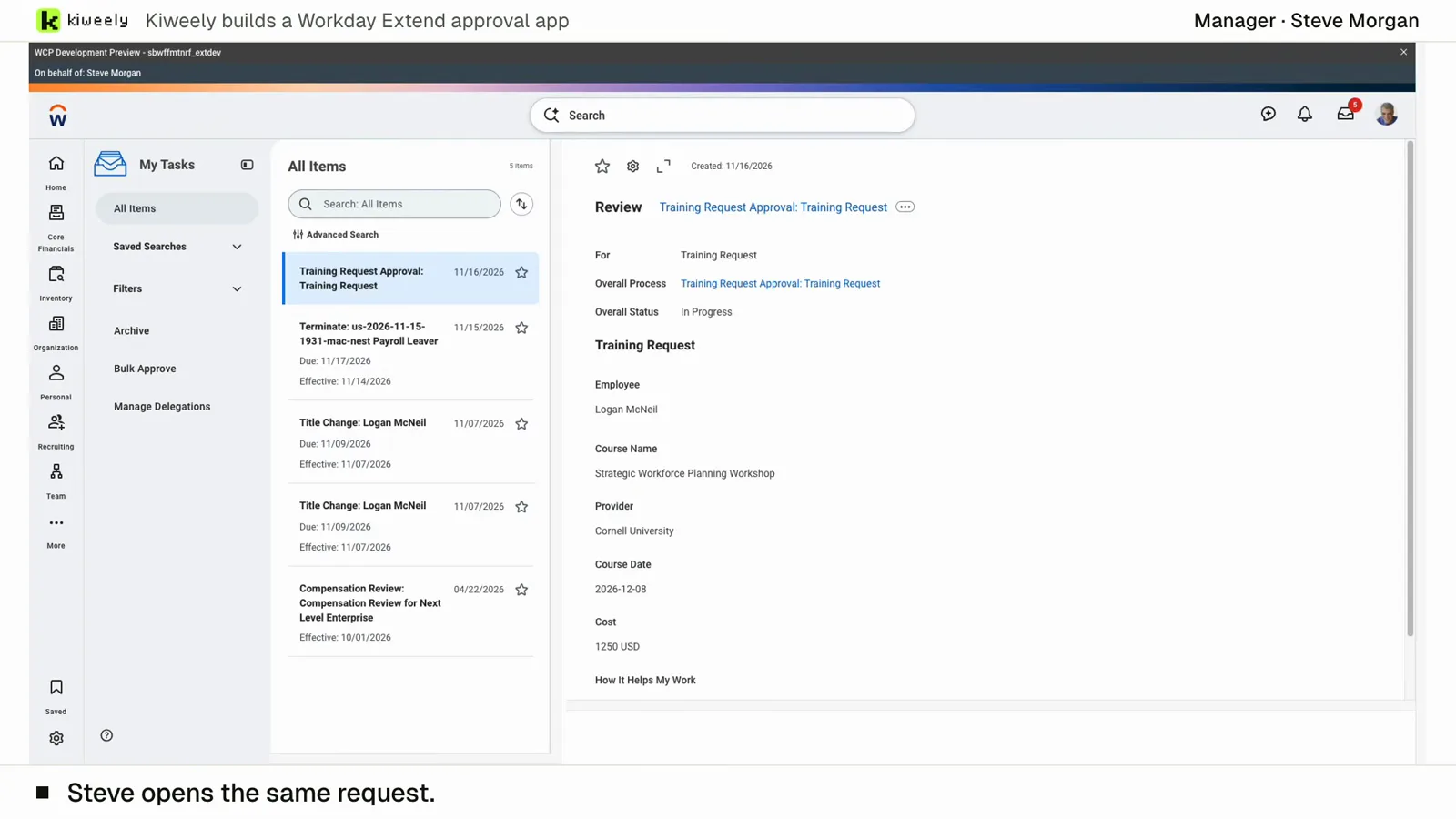
From two short messages, Kiweely Vine builds a training approval app in a Workday Development tenant. It sets up the app’s access (Employee As Self and Manager) and the approval’s business process security policy, activates the pending security changes, adds the Manager step to the routing, then tests it as the employees and managers through Start Proxy, privacy checks included. 1 h 51 min from sign-up to the checked result.
How every option compares, from ChatGPT and Claude to Workday’s own agents and the testing suites: the best AI tools for Workday, compared.
Watch the film (15 min) · Start for free
Frequently asked questions
Can Workday's Deployment Agent change a business process or a security policy?
As Workday documents it, no. Workday describes its live tenant access as read-only inspection, and it is not available as a conversation assistant in Production. It identifies the policy and permissions involved and you make the change yourself. With Configuration Cloud, in opt-in early access for Workday partners since 18 Nov 2026, Deployment Agent can carry out changes once approved.
Can Workday's BP Optimize Agent or Admin Agent change a business process?
Workday documents BP Optimize Agent as analysing your business processes and recommending changes with step-by-step guidance, which you review and implement. Workday's Admin Agent one-pager says it analyzes, optimizes and guides, and the administrator guide has no page for it. Business Process Copilot Agent was named in press coverage of a September 2025 preview, and we found no Workday page for it.
Which tenants can an AI agent change?
Kiweely Vine works in the tenants a conversation is connected to, Development, Sandbox, Implementation or Production. In Production the agent makes changes one at a time with read-back, and Extend deploy and promotion never reach Production.
Does the agent use my Workday security?
Kiweely Vine works through Workday's own screens with the sign-in you give it, so Workday security decides what it can open. It needs a sign-in with the access the change requires.
What does it cost to use an agent for configuration work?
Workday's Deployment Agent meters 5 Flex Credits per Ask interaction in Implementation and Sandbox tenants, and BP Optimize Agent 1 Flex Credit per 10 business process events. Kiweely Vine Free is $0 in a Workday personal developer tenant; Vine Personal is $99 a month or $990 a year; Vine Team is $149 per seat per month, two seats at least.
Sources checked
- Deployment Agent in Implementation Environments and Customer Central
- Reference: Deployment Agent Skills and Capabilities
- Enable Deployment Agent Ask Skill
- About BP Optimize Agent
- Concept: BP Optimize Process Improvement Skill
- Concept: Agent Security
- Workday: Meet Admin Agent (one-pager)
- Workday Flex Credits Rate Card (last updated November 5, 2026)