


Functional consultants are being asked to “put AI on the business process” without being handed a developer tenant. Workday’s public pages do describe a path. They do not describe a path where a functional design document becomes a live agent by itself.
Workday Extend, on the Agent & App Builder page, is the product that unlocks the Workday Build developer platform so teams can build, run, and surface custom agents, apps, and orchestrations. The same page says you can build in plain language in an agentic coding tool or inside Agent & App Builder, and that Extend AI is the primary product for building and running agents on Workday. Developer Agent is described as selecting tools, writing code, and wiring workflows across 50+ built-in skills. The Developer Agent marketing page says it is generally available starting 2026R2+, through Workday Extend Professional, with Flex Credits-based pricing, and tells you to contact your Workday account team for access. This article does not invent a SKU checklist beyond that sentence.
Custom agents and Workday-built agents are different catalogs. The admin-guide table (Deployment Agent, Self-Service Agent, BP Optimize Agent, and the others) is what Agent Management Hub registers from SKUs you already have. A custom agent is something you build.
What the developer documentation actually assigns you
Workday’s custom-agent overview gives a three-stage process.
Build and deploy. In App Builder you build a custom agent as an Agent app or as an Extend app, with Developer Agent or by hand. Deploying pushes the agent definition and skill files into Agent System of Record (ASOR).
Register. In development environments, ASOR registers the custom agent automatically. You still configure security and activate it before anyone sees it. For higher environments, Workday says you first configure the agent in Workday App Manager, then complete ASOR registration and security. The overview is explicit: ASOR is the gate for the Workday chat panel. Before configuration and activation, the agent is hidden.
Invoke. People can open the custom agent from the Self-Service Agent chat panel, from Sana, from the business process framework, from an agent-to-agent protocol, or from the Model Context Protocol. Custom agents are delegate-mode only. Workday has not, on this page, described a custom agent that runs on a schedule with no user.
An Agent app is not a full Extend app. It does not count against Extend app entitlements, and it cannot include presentation or model components. If the requirement is a new business object or a page workers live in, you are outside an Agent-app-only design. Say that in the statement of work.
What stays functional work
| Decision | Why it is not “the developer will know” |
|---|---|
| DecisionWhich Workday-built agent already does this | Why it is not “the developer will know”The admin reference lists Self-Service Agent for personal data, time off, goals, team learning, and policy articles, and BP Optimize Agent for process recommendations. Building a custom agent to duplicate a SKU you own is a product choice, not a default. |
| DecisionWho may invoke it | Why it is not “the developer will know”ASOR Available To security groups. The custom-agent page says an agent system user is created the first time you activate with a security group assigned. You do not type that account in by hand. The user’s own permissions and the agent’s permissions are separate: a person can invoke an agent that does something they cannot do themselves, and the reverse. Write down which of those two you intend. |
| DecisionWhat the business process still approves | Why it is not “the developer will know”Invoke-through-business-process is a published path. The process definition, condition rules, and approvers are still functional configuration. |
| DecisionEligibility versus condition | Why it is not “the developer will know”Calculated fields can drive condition rules. Workday says they cannot be eligibility rules. A custom agent does not remove that limitation. |
| DecisionProof | Why it is not “the developer will know”Activation hides or shows the agent. It does not prove a worker in a constrained role gets the right rows. That test is still yours, in a non-production tenant. |
Developer Agent can discover tools and compose a skill file. The functional spec still has to name the business object, the population, and the step that must remain human. “Make hiring faster” is not a skill file.
What this article will not pretend Workday published
The Agent & App Builder page includes customer-result figures (time-to-value, hours, invoice counts, apps in nine months). Those are marketing claims on that page, not a benchmark you can paste into a proposal as your client’s expected savings.
The custom-agent page says all tool calls at runtime happen under the agent system user’s grant, that audit trails record the agent identity, that redeploying does not create a new agent system user, and that deactivating the agent deactivates that user. It also says the runtime cannot call arbitrary APIs. Calls go through the clients Workday lists for tool categories. If a design needs a web service the agent runtime does not expose, the honest status is “not on this platform path,” not “we will prompt until it works.”
Flex Credits apply to Developer Agent after an annual invocation allowance. The Developer Agent page says pricing is Flex Credits-based and points you to your account team. The public Flex Credits page says you pay for defined work, and that Workday meters almost exclusively in production, with complimentary credits and free non-production testing for most agents. Read the rate card in the customer’s agreement before you estimate. Do not quote a credit count from a blog.
A practical split on a project
- Consultant: process sentences, populations, what must remain an approval, which Workday-built agent was considered and rejected, and the non-production test users.
- Whoever holds Extend Professional: App Builder or Developer Agent, the agent app versus a full Extend app, and deploy.
- Security admin: ASOR already set up in that tenant (it does not migrate), unconstrained group for administration, then the security group on the custom agent, then activate.
- Consultant again: the hidden-until-activated check, a test as the invoking user, and a note that delegate mode means a person is in the loop. There is no published ambient mode for these custom agents.
Kiweely Vine is a separate product for consultants and developers who want an assistant to build and test in the tenant through their own Workday sign-in. It is not Workday Extend, and it does not register a custom agent for you inside ASOR. Use Workday’s pages above for the Extend path.
Watch Kiweely Vine build, secure and test an Extend app
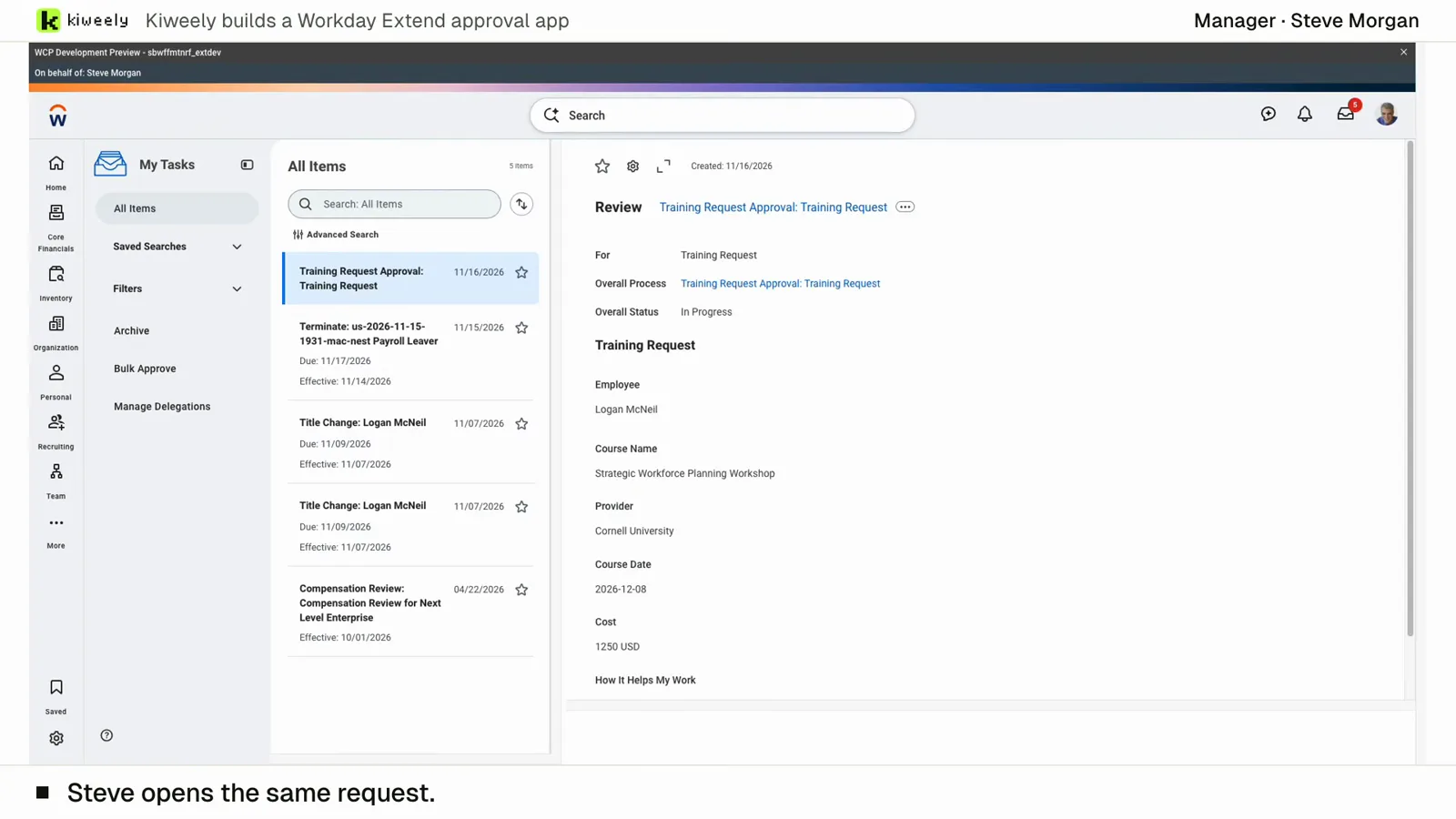
From two short messages, Kiweely Vine builds a training approval app in a Workday Development tenant. It sets up the app’s access (Employee As Self and Manager) and the approval’s business process security policy, activates the pending security changes, adds the Manager step to the routing, then tests it as the employees and managers through Start Proxy, privacy checks included. 1 h 51 min from sign-up to the checked result.
Watch the film (15 min) · Start for free
Frequently asked questions
Can a functional consultant build the agent in plain language?
Workday says Developer Agent and Agent & App Builder accept plain language, inside an Extend Professional entitlement. The consultant can write the prompt. Someone with that entitlement still has to run it and deploy. Higher environments need App Manager plus ASOR security. That is tenant administration, not a Community reply.
Do Agent apps count against our Extend app limit?
Workday’s custom-agent page says Agent apps do not count against Extend app entitlements, and they cannot include presentation or model components. A requirement that adds a business object is a full Extend app conversation.
Will the agent show up for employees the day it deploys?
Not until ASOR configuration and activation. Before that, Workday says it is hidden from the chat panel. Development environments auto-register. Higher environments do not skip App Manager and security.
Does this replace Self-Service Agent?
Only if you intentionally build something Self-Service Agent does not do. Self-Service Agent is the Workday-built conversational agent for common worker and manager requests, with skills you enable. A custom agent can be opened from that chat panel, which is an additional agent, not a setting inside a skill.
Sources checked
Workday pages in the frontmatter, fetched 2026-11-16. Kiweely Vine is described only as a separate product, not as an Extend feature.