


Workday Mass Action Tables now handle up to 5,000 routine job, organization, and base-pay updates directly inside My Tasks, eliminating the weekly ritual of building an inbound Change_Job Enterprise Interface Builder (EIB) spreadsheet for internal reorganizations. Inbound HR EIBs have not disappeared, though: the moment your source of truth arrives as a messy external file from finance, an acquisition, or a business leader’s offline tracker, an interactive browser grid stops helping and staging-and-crosswalk work takes over.
For years, Workday HRIS teams treated inbound EIBs as the universal wrench for anything above twenty rows. Moving 300 engineers to a new cost center, shifting a call center to a new location, or changing supervisory reporting lines after a director departure meant generating an EIB spreadsheet template, fighting hidden column headers, running Launch / Schedule Integration, and deciphering XML SOAP fault lines in the error toolbar. Workday’s shift from Worksheets-based Mass Actions Workbooks to standalone Mass Action Tables changes that boundary in a specific, architectural way.
What Changed Between Mass Actions Workbooks and Mass Action Tables?
Earlier bulk front-end tools in Workday required configuring Drive and Worksheets, capping population reports at roughly 1,000 workers per workbook, and working around constrained security limitations on the Complete Mass Action step. With Mass Job Change, Workday decoupled bulk job updates from Worksheets altogether.
Once an administrator enables Mass Job Change in Maintain Feature Opt-Ins (a one-way opt-in today that becomes automatic for all customers in 2027R1), HR Partners and operations leads initiate bulk updates through the Start Mass Job Change report or Start Mass Action task. Workday builds an interactive, tabbed table in My Tasks capable of holding up to 5,000 eligible positions at once.
Three mechanics make Mass Action Tables materially safer than an HR admin running an inbound EIB under a high-privilege account:
- Contextual, constrained row security. Unlike an inbound EIB that typically executes under an Integration System User or a broad HR administrator role, Mass Action Tables enforce role-based and intersectional security row by row. An HR Partner constrained to North America only sees and edits North American positions; unauthorized or unfilled positions are excluded automatically and tallied under Positions Excluded on the My Tasks item.
- Real-time Workday and custom validations before submission. When you apply Mass Edit across 800 selected rows or fix one exception in the single-row editor, Workday evaluates standard staffing rules, out-of-order event warnings, and custom condition rules against the target effective date before firing downstream business processes.
- First-class review, approval, and batch rescind. By adding Review Mass Action Event and Approve Mass Action Event action steps onto the Mass Action Event business process, reviewers get an editable table to clean up row errors while final approvers get a read-only table for sign-off. If an approved reorganization gets called off, enabling Enable Rescind on View Mass Action Type lets authorized users rescind the completed Mass Action Event from the Archive tab of My Tasks.
Subprocess tabs require dual template setup
Adding Change Organization Assignments for Worker or Propose Compensation Change to your template in Maintain Change Job Templates is not enough to make the Organization Assignments or Compensation Change tabs appear on a Mass Job Change Table. You must also add each subprocess to the Templates grid for Change Job in Configure Business Process Consolidated Template.
Which Routine HR EIBs Should Retire Right Now?
If the workers already exist in your tenant and you can express the change by filtering a Workday facet report and applying a handful of Mass Edit rules, building an EIB is wasted effort. Every week, HRIS teams can retire spreadsheet loads for four recurring patterns:
| Bulk HR Scenario | Best Native Tool | Why It Beats (or Still Needs) an Inbound EIB |
|---|---|---|
| Bulk HR ScenarioMoving 150–5,000 employees to a new Location, Cost Center, or Job Profile | Best Native ToolMass Job Change Table (Start Mass Job Change) |
Why It Beats (or Still Needs) an Inbound EIBFacet filters pick the live population; cell change indicators show old vs. proposed values; contextual security and Approve Mass Action Event keep audit trails clean. |
| Bulk HR ScenarioVisual multi-layer org redesign (creating, moving, or inactivating supervisory orgs) | Best Native ToolOrg Studio + Mass Actions | Why It Beats (or Still Needs) an Inbound EIBStakeholders model reporting trees visually, then transfer the approved design to execute org and worker moves without hand-sequencing parent-child org EIBs. |
| Bulk HR ScenarioBulk cost-center or company reassignments under 1,000 workers without job changes | Best Native ToolLaunch Mass Action Event (Change Organization Assignments for Worker) |
Why It Beats (or Still Needs) an Inbound EIBInline prompt validation and error isolation let valid rows submit while invalid rows stay behind for cleanup. |
| Bulk HR ScenarioLoading 1,200 bespoke off-cycle merit adjustments, allowance plans, or M&A job mappings from Excel | Best Native ToolInbound EIB (with pre-load validation) | Why It Beats (or Still Needs) an Inbound EIBMass Action Tables have no CSV upload button, cannot assign new compensation plans, and cannot reconcile external worker IDs or unstandardized location names. |
Notice one subtle operational detail when teams adopt Mass Action Tables for reorganizations: each submitted row still initiates the underlying Change Job business process. If your standard Change Job definition routes through three layers of manager and compensation approvals, submitting a 2,000-row table will flood My Tasks unless you configure rule-based business process definitions keyed off the Mass Action Type report field (see our guide on fixing condition rules that fail in production).
Why Dirty External Data Still Forces You Back to Inbound EIBs
Walk into any mid-year acquisition, sales territory carve-out, or finance-led restructuring, and the request never starts inside Workday. It starts as an .xlsx attachment exported from an external planning model, a legacy HRIS, or six regional VPs who each invented their own job title spelling.
Mass Action Tables break down immediately in those workflows for four concrete reasons:
- No external file import into a Mass Action Table. You select a population inside Workday (by supervisory organization, custom facet report, Worker IDs, or Position IDs) and edit cells in the UI via Mass Edit or single-row edit. If every row carries a distinct proposed salary, a distinct target manager, and a distinct effective date calculated in an external model, typing 900 row-by-row overrides in a browser grid is slower and more error-prone than generating an EIB load.
- Strict compensation boundaries. On a Mass Job Change Table, the Compensation Change tab only modifies existing Salary and Hourly plans via Adjust Base Pay Plans or updates Change Compensation Guidelines. It cannot assign a new allowance or bonus plan, excludes contingent workers, and skips workers whose primary compensation basis is Manage Basis Total (MBT).
- Population homogeneity and scale caps. Workday recommends keeping employees and contingent workers (and Position Management vs. Job Management organizations) out of the same Mass Job Change Table, caps each table at 5,000 rows, and does not support partial table submissions when you click Submit Table (every remaining row on the table is processed).
- Web service breadth. Inbound EIBs wrap hundreds of Workday SOAP operations across Benefits, Payroll, Recruiting, Financials, and Talent (
Put_Payroll_Input, one-time payments, personal information loads, position restrictions) that have no Mass Action Table equivalent. When an EIB fails halfway through, you still need disciplined Workday EIB load error triage and template hygiene (troubleshooting EIB spreadsheet template errors).
Decision Rule for Bulk HR Updates:
1. Population defined inside Workday + uniform/grouped edits + <= 5,000 workers
   -> Use Start Mass Job Change (Mass Action Table)
2. Per-row heterogeneous values from external CSV/Excel OR new comp plans OR > 5,000 rows
   -> Crosswalk against live tenant metadata + load via Inbound EIB
How AI Changes the Dirty-Spreadsheet Half of the Problem
Here is the real irony of modern HRIS operations: Workday solved the clean, internal bulk change problem with Mass Action Tables, which means the EIBs left on an HRIS analyst’s desk are exclusively the ugly ones. They are the spreadsheets where column D says "Austin Office" instead of LOC_US_TX_AUSTIN_01, column G lists managers by preferred nickname instead of Employee_ID, and thirty workers in the file have pending future-dated staffing events that will collide on load.
Generic chat tools cannot clean that file because they cannot see your tenant’s reference IDs, active Change Job reasons, compensation package eligibility rules, or open staffing events (see turning a messy spreadsheet into a clean Workday EIB load). That gap is why we built Kiweely Vine for consultants and Kiweely Nest for internal HRIS teams.
Connected directly to your tenant with explicit approval gates (see how connections and consent work), Kiweely reads live reference IDs, organization structures, and worker state first. When a bulk request belongs in a Mass Job Change Table, Kiweely can audit your Maintain Change Job Templates, Configure Business Process Consolidated Template, and Mass Action Event security policies so HR Partners can self-serve safely. When the data arrives as a dirty external workbook that only an EIB can carry, Kiweely crosswalks every name, location, cost center, and compensation plan against live tenant metadata, flags out-of-sequence worker conflicts before launch, and builds a validated EIB payload without artificial row caps. Vine Free is free for your Workday personal developer account and its tenant. Any other tenant needs Vine Personal at $99 a month for one person, or a Vine Team seat at $149 a month.
A Practical Governance Split for HRIS Leaders
Before 2027R1 retires Mass Actions Workbooks for mass Change Job across every tenant, draw a hard architectural line between your HR operations team and your integrations queue:
- Opt in to Mass Job Change in Sandbox via Maintain Feature Opt-Ins, build dedicated templates in Maintain Change Job Templates with Mass Actions selected under Select Initiation Actions, and wire rule-based Change Job definitions using the Mass Action Type field so bulk reorganizations do not trigger thousands of manager inbox approvals.
- Grant
Change Job (Mass Action)deliberately. On the Change Job business process security policy, every security group that initiates, completes, reviews, or approves a Mass Job Change Table needs permission on the Change Job (Mass Action) initiating action, paired with Mass Action Events domain access and Activate Pending Security Policy Changes. - Reserve inbound HR EIBs for external source data. Stop letting analysts build ad-hoc EIB spreadsheets for simple supervisory or cost-center moves that HR Partners can run with contextual security in Start Mass Job Change, and focus engineering rigor on validating external conversion, merit, and M&A loads before they touch Production.
Watch Kiweely Vine build and load an EIB
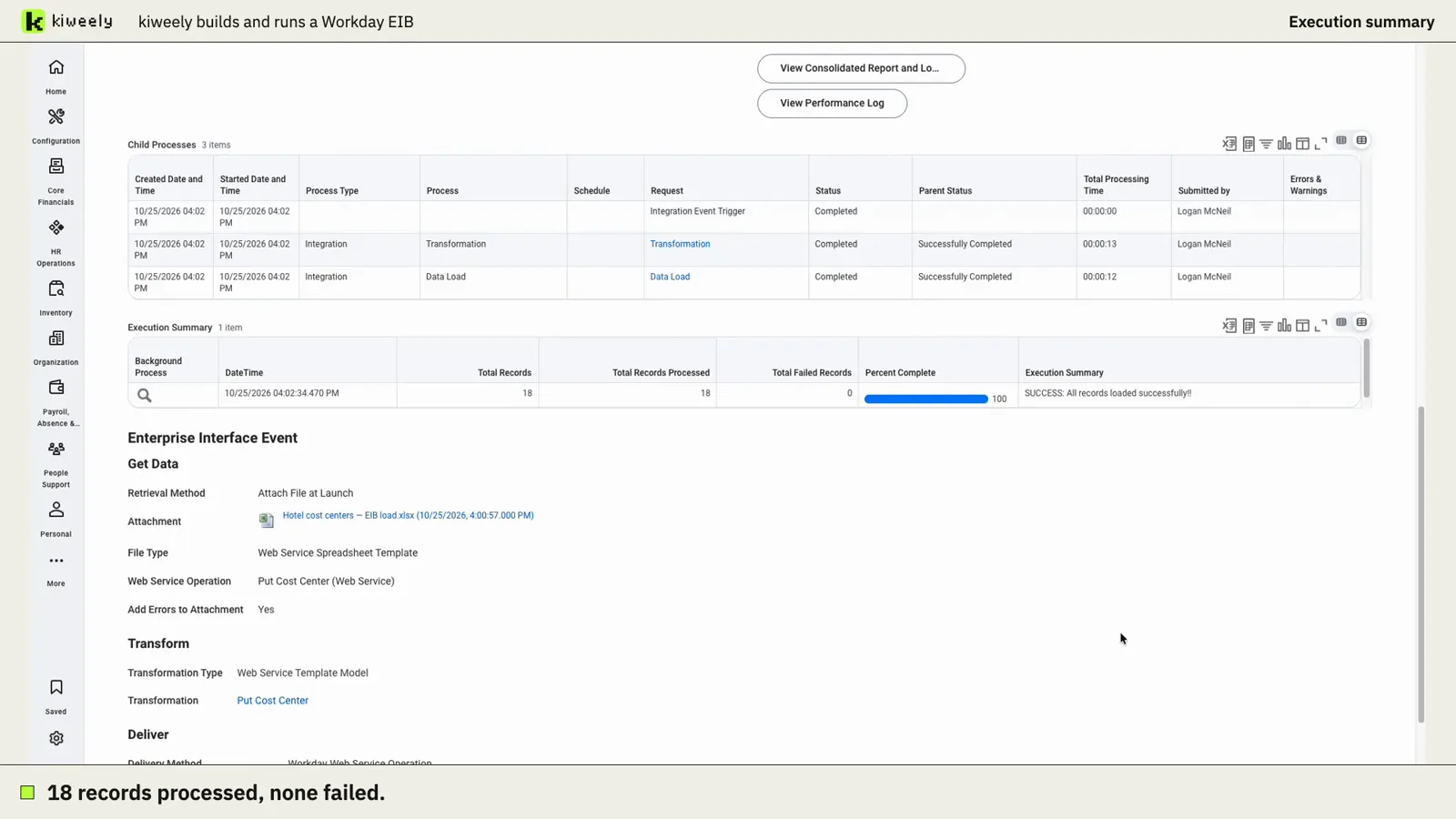
Kiweely Vine takes a messy cost center spreadsheet, lists its problems, asks only the business questions, builds the EIB on Workday’s own template and launches it in a Workday Development tenant. Workday reports 18 processed, 18 loaded, 0 failed. 97-minute recorded run, first-use setup included.
Watch the film (13 min) · Start for free
Frequently asked questions
When does Mass Job Change replace Mass Actions Workbooks in Workday?
Customers can opt in to Mass Job Change today through the Maintain Feature Opt-Ins task, and opting in is permanent for mass Change Job processing. Starting in 2027R1, Mass Job Change automatically replaces Mass Actions Workbooks for mass Change Job across all Workday tenants.
How many rows can a Workday Mass Job Change Table process at once?
A single Mass Job Change Table supports up to 5,000 transactions. By comparison, Org Studio reorganization designs and older Mass Action Workbooks are sized around 1,000 to 2,000 transactions per workbook for best performance.
Can a Mass Job Change Table assign a brand-new compensation plan to workers?
No. The Compensation Change tab inside a Mass Job Change Table can adjust guidelines and increase or decrease existing Salary and Hourly plans, but it cannot assign new compensation plans, update contingent workers, or modify workers on Manage Basis Total.
Why do HRIS teams still need inbound EIBs if Mass Action Tables exist?
Mass Action Tables generate rows from an existing Workday population and apply edits interactively in the browser. You cannot upload an external CSV or finance spreadsheet containing hundreds of bespoke per-worker values, unmapped legacy IDs, or non-supported web service operations.